Ready to Try GoHighLevel?
Get the all-in-one platform for CRM, automations, funnels & websites — built for agencies.
Start your free trial and explore every feature.
GoHighLevel includes 100+ free funnel templates built into the platform, organized by industry (real estate, fitness, automotive, financial, coaching, agency, ecommerce, and more). Every template is editable with the drag-and-drop builder, mobile-responsive by default, and free on every GHL plan including Starter ($97/month). Premium funnel templates from marketplaces and third-party providers typically cost $47 to $497. Funnel templates work great for single conversion goals (lead capture, opt-in, booking, VSL). For multi-page websites with navigation and blogs, use website templates instead. For full systems with workflows and automation, snapshots are the better choice. This guide covers everything: where to find templates, how to import them, customization, and when to choose free vs paid vs snapshots.
Building a funnel from scratch in GoHighLevel takes 3 to 8 hours, depending on complexity. Importing a template takes 5 minutes.
That’s why funnel templates matter. They give you a working starting point with proven structure, then you customize the copy, images, and branding to match your offer.
This guide covers everything: what GHL funnel templates actually are, the 100+ free templates inside the platform, premium options from the marketplace, how to import and customize them properly, and when to use a funnel template vs a snapshot vs a website template.
What Are GoHighLevel Funnel Templates?
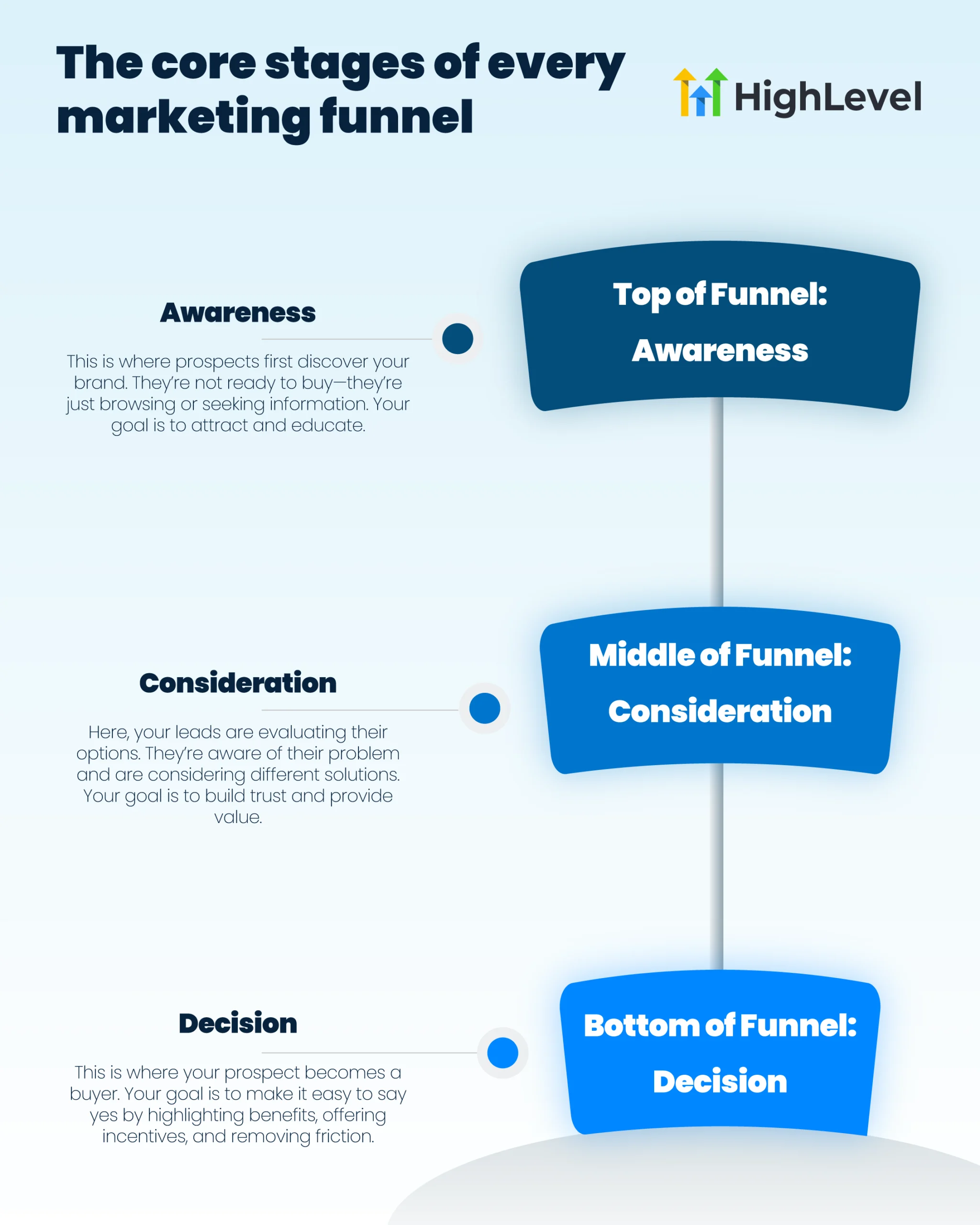
A GoHighLevel funnel template is a pre-built sequence of pages designed to drive a specific conversion. Common funnel structures include:
- Opt-in page → Thank you page
- Landing page → Booking page → Confirmation
- VSL (Video Sales Letter) → Order form → Upsell → Receipt
- Webinar registration → Replay → Offer
- Lead magnet download → Email nurture → Sales page
Each template ships with pre-styled pages, working forms, navigation between pages, and a layout designed for one job: converting visitors into leads or buyers.
You import the template, replace placeholder copy and images with your offer details, connect the form to your CRM pipeline, and publish. Most templates are ready to go live in 30 to 60 minutes.
Funnel Templates vs Website Templates vs Snapshots: The Difference
People confuse these three constantly. Each is for a different job.
| Feature | Funnel Template | Website Template | Snapshot |
|---|---|---|---|
| Pages | 1 to 5 (conversion path) | 5 to 15+ (multi-page site) | Multiple funnels and pages |
| Navigation | None (deliberate, for conversion focus) | Full menu and footer | Varies by snapshot |
| Workflows included | No | No | Yes (full automation) |
| Pipelines included | No | No | Yes |
| Best for | Paid ad traffic, single offers | Organic traffic, brand presence | Complete client systems |
| Setup time | 30 to 60 minutes | 1 to 3 hours | 1 to 3 hours plus customization |
Quick rule:
- Use a funnel template when you want one specific conversion (book, opt-in, buy)
- Use a website template when you want a multi-page brand presence with blog and SEO
- Use a snapshot when you want the funnel plus automation, workflows, and pipelines as a complete system
The 100+ Free Funnel Templates Inside GoHighLevel
GoHighLevel includes 100+ free funnel templates built into the platform. They’re maintained by the HighLevel team and community contributors, organized by industry and funnel type.
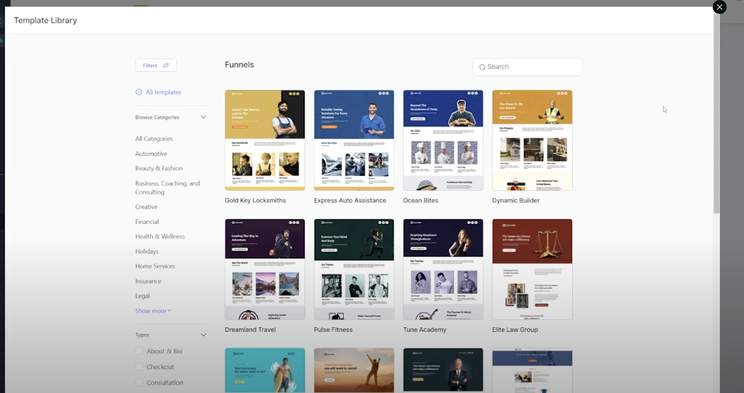
Native Template Library Categories
The built-in library is organized into categories so you can find the right template fast:
- Real estate: Buyer leads, seller leads, home value funnels, neighborhood guides
- Fitness: Gym free trials, personal trainer booking, online program signups, challenge funnels
- Financial services: 39+ templates for accounting, credit repair, financial planning, investment lead gen
- Automotive: 30+ templates for detailing, car washing, dealerships, service shops
- Healthcare and medical: Dental, chiropractic, med spa, mental health booking funnels
- Legal: Law firm consultation funnels, practice-area-specific landing pages
- Local services: Plumbing, HVAC, roofing, electrical, landscaping quote funnels
- Coaching and consulting: Discovery call booking, application funnels, VSL funnels
- Course creators: Webinar registration, course sales, membership signup funnels
- E-commerce: Single-product order forms, upsell sequences, lead magnet funnels
- Agency: Lead capture, service sales, audit request funnels
- Restaurants: Reservation, online ordering, loyalty program funnels
All native templates are free on every GHL plan starting at $97/month. You can use them across unlimited sub-accounts.
What Makes Free GHL Funnel Templates Good (And What They Lack)
Good things:
- Professionally designed and tested
- Mobile-responsive out of the box
- Editable with the drag-and-drop builder, no code required
- Forms connect directly to your CRM pipeline
- Free on every plan
- Coverage across most common business types
What they lack:
- Generic copy that needs heavy rewriting
- Stock photos that signal “template” to visitors
- Similar structures across many users (your competitor probably uses the same template)
- No bundled workflows or automation (just the pages)
- No niche-specific conversion optimizations (built for broad use, not specific offers)
For most beginners and small businesses, free templates are enough. For agencies running niche specialization or businesses where the funnel directly drives revenue, premium options earn their cost.
Free vs Paid Funnel Templates: Which Should You Use?
| Use Free Templates If | Use Paid Templates If |
|---|---|
| You’re new to GoHighLevel and learning the builder | You serve a specific high-ticket niche (medical, legal, real estate luxury) |
| You’re testing an offer for the first time | You need a unique design that doesn’t look templated |
| Budget is tight | You want proven conversion structure built in |
| You build many client funnels and need fast starting points | You’re running high-cost paid traffic where conversion rate matters |
| The funnel is for internal use or MVP testing | You want bundled copy, workflows, or industry-specific elements |
Premium Funnel Template Pricing in 2026
Paid funnel templates from marketplaces and third-party providers typically run:
- Single funnel template: $47 to $197
- Niche industry funnel pack: $197 to $497
- Premium high-converting funnels with copy: $297 to $997
- Custom-built funnels by designers: $500 to $3,500
Premium funnels often include:
- Niche-specific layouts and design
- Pre-written conversion copy
- Mobile-optimized custom design
- Free lifetime updates from the creator
- Sometimes bundled with snapshots, workflows, or training
How to Import a GoHighLevel Funnel Template
There are three ways to add a funnel template to your account.
Method 1: Import From the Native Template Library
- Log into your GHL sub-account
- Go to Sites → Funnels
- Click + New Funnel
- Choose Create from Template
- Browse by category or use the search bar
- Click any template to preview on desktop and mobile
- Click Use Template to import
- Name your funnel and confirm
The template loads into your account ready to customize. This is the fastest method and uses the free native library.
Method 2: Import a Funnel Share Link
If someone shared a third-party funnel link with you (free or paid):
- Go to Sites → Funnels
- Click Import Funnel
- Paste the share link
- Select the destination sub-account if you have access to multiple
- Click Import
- Wait 1 to 2 minutes for the import to complete
Method 3: Import Through a Snapshot
If the funnel is bundled inside a snapshot (along with workflows, pipelines, calendars):
- Go to Sub-Accounts → Snapshots → Load Snapshot
- Paste the snapshot link or select from your snapshot library
- Choose what to import (funnels only, or full snapshot with workflows)
- Import to a sub-account
Snapshots include the funnel plus all related systems. Use this method when you want the full automation, not just the pages.
How to Customize a Funnel Template Properly
Importing the template is the easy part. Customization is where most launches succeed or fail.
- Replace all placeholder copy. Headlines, subheadlines, body text, button text. Templates ship with generic copy (“Get Your Free Quote Today”). Replace with specific, benefit-driven copy for your actual offer.
- Replace all stock images. Use real photos of you, your team, your work, your location. Stock photos signal “template” to visitors. Use WebP format to keep file sizes small.
- Set brand colors and fonts. In Funnel Settings, configure your primary, secondary, and accent colors plus header and body fonts. Applies globally across the funnel.
- Upload your logo. Replace placeholder logos in the header and footer.
- Connect every form to a pipeline. Click each form element → Edit → set Pipeline, Pipeline Stage, and a Workflow trigger. Without this, submissions land in Forms but never enter your CRM.
- Connect calendar widgets. If the template has booking elements, click each one and select your sub-account calendar from the dropdown.
- Set up payment integrations. If selling, connect Stripe and set product pricing in the funnel checkout settings.
- Configure thank-you page redirects. Where should visitors go after form submit? Inline confirmation, redirect to thank-you page, or trigger a booking flow.
- Set unique meta titles and descriptions per page. Page Settings → SEO. Generic meta tags hurt rankings.
- Compress all images to WebP. Squoosh.app or TinyPNG. Aim for under 500KB per image. Heavy images kill mobile load speed.
- Check mobile preview. Switch to mobile view in the builder. Verify headline, form, and CTA work on small screens.
- Connect your custom domain. Funnel Settings → Domain. Add the CNAME record at your DNS registrar. SSL provisions automatically.
- Test the full flow. Submit a test form. Verify the contact lands in your CRM. Check automation triggers. Test the payment flow if you’re selling.
Best Funnel Templates by Niche
GHL’s free library has strong coverage in these niches. If you’re in one of these industries, the native library is usually enough.
Local Service Businesses
HVAC, plumbing, roofing, electrical, landscaping. Best funnel types: short-form lead capture, free estimate request, emergency call funnels. Phone-first design with sticky call buttons works best.
Healthcare and Med Spa
Dental, chiropractic, med spa, mental health. Best funnel types: appointment booking funnels with embedded calendar, free consultation request, treatment-specific landing pages.
Real Estate
Buyer agents, seller agents, brokers. Best funnel types: home value estimator funnels, buyer guide download funnels, listing alert signup funnels.
Coaching and Consulting
Business coaches, life coaches, fitness coaches. Best funnel types: VSL funnels for high-ticket offers, application funnels for screened clients, discovery call booking funnels.
Course Creators
Online courses, digital products, memberships. Best funnel types: webinar registration funnels, course sales pages with VSL, lead magnet download to email nurture.
Agency
Marketing agencies, design firms, consultants. Best funnel types: free audit request funnels, case study landing pages, discovery call booking.
Fitness
Gyms, personal trainers, yoga studios. Best funnel types: free trial week funnels, challenge signup funnels, online program sales.
E-commerce
Single-product offers, lead-gen-driven retail. Best funnel types: single-product order forms, upsell sequences, abandon-cart recovery sequences.
The High-Level AI Studio Update: How AI Changes Funnel Building in 2026
The biggest 2026 update in funnel creation: HighLevel AI Studio, available free in HighLevel Labs.
Instead of picking a template and editing it, you describe what you want in plain English. AI Studio generates the layout, copy, images, and full funnel structure.
For funnel building specifically, AI Studio can create:
- Lead capture funnels from a text prompt
- Multi-step booking funnels with calendar integration
- VSL funnels with placeholder video and offer copy
- Webinar registration funnels with countdown timers
- Funnels recreated from a URL reference (paste a competitor link, AI extracts the style and structure)
- Funnels designed from a screenshot upload
How AI Studio changes the template decision:
- If you’d have paid $200 for a premium template, AI Studio can often generate something comparable from a prompt
- You can iterate fast with follow-up commands (“add a testimonial section,” “make the hero darker”)
- Output isn’t always production-ready and usually needs polish
- AI Studio projects live in their own workspace separate from standard Funnels (limitation)
For 2026, the smart workflow is: use AI Studio for the initial structure and copy, then refine with template-quality polish using either free or premium templates. Or use the AI suggestions as inspiration and build inside the standard funnel builder.
Common Funnel Template Mistakes That Hurt Conversion
1. Leaving placeholder copy in headlines. “Welcome to Our Service” or “Your Headline Here” still showing on a live page kills credibility immediately. Replace every line.
2. Using stock photos that look obviously generic. Visitors recognize stock imagery in seconds. Real photos of you and your work always outperform stock.
3. Not connecting forms to a pipeline. Submissions show in Forms but never enter CRM workflow. Set Pipeline, Pipeline Stage, and Workflow trigger on every form.
4. Forgetting to remove navigation menus. Some templates have nav links that distract from the conversion goal. Strip all navigation from ad landing pages.
5. Skipping mobile preview. Most traffic is mobile. If your hero image pushes the form below the fold on mobile, you lose leads.
6. Publishing on the GHL subdomain. Default funnels publish to a long GHL subdomain. Set your custom domain before running any traffic. If you change domains later, all your ad URLs break.
7. Not testing the payment flow. If you’re selling, make a real test purchase yourself (then refund it). Verify Stripe receives the payment and the customer enters your CRM correctly.
8. Generic CTAs. “Click Here” and “Submit” lose to specific action buttons: “Get My Free Quote,” “Book My Consultation,” “Start My 30-Day Trial.”
9. Slow load speed. Uncompressed hero images push mobile load times above 3 seconds. Compress to WebP before upload.
10. No urgency or scarcity element. Templates often skip countdown timers and limited-availability messaging. Add appropriate urgency for time-sensitive offers.
The Bottom Line on GoHighLevel Funnel Templates
GHL’s 100+ free funnel templates are good enough for most launches. Customize the copy, replace stock images, connect your CRM, and you have a working funnel in under an hour.
Premium templates earn their cost in specific situations:
- High-cost paid traffic where conversion rate makes a real difference
- Niche-specific industries where generic templates underperform
- Agencies serving a specific vertical at scale
- Anyone who wants bundled workflows, copy, or industry expertise built in
Three rules to follow:
- Pick the right tool for the job. Funnel template for single conversions, website template for brand presence, snapshot for full systems.
- Customize heavily before launch. Real photos, real testimonials, real copy. Templates only work when you make them yours.
- Set your custom domain before any traffic. Don’t run ads to a GHL subdomain you’ll change later.
Start with the free native library. Upgrade to premium when a specific need justifies it. Try AI Studio when you want something more custom without paying for a designer.
Article verified and updated for 2026.
Frequently Asked Questions
How many free funnel templates does GoHighLevel offer?
GoHighLevel includes 100+ free funnel templates built into the platform, organized by industry and use case. Categories include real estate, fitness, financial services, automotive, healthcare, legal, local services, coaching, course creators, e-commerce, agency, and restaurants. All native templates are free on every GHL plan and can be used across unlimited sub-accounts.
Are GoHighLevel funnel templates free?
Yes. All native funnel templates inside the GoHighLevel Template Library are 100% free and included with every plan starting at $97/month. You can use them across all your sub-accounts including your business and your clients. Paid funnel templates are available from third-party marketplaces (typically $47 to $497), but the native library is free.
Where do I find funnel templates in GoHighLevel?
In your GHL sub-account, go to Sites → Funnels → + New Funnel → Create from Template. The library opens with all 100+ free templates organized by category. You can filter by industry, use case, or search for specific keywords. Preview each template on desktop and mobile before importing.
How do I import a third-party GoHighLevel funnel template?
For funnel share links (from premium providers or other agencies): go to Sites → Funnels → Import Funnel and paste the share link. The template loads into your sub-account in 1 to 2 minutes. For funnels bundled inside snapshots: go to Sub-Accounts → Snapshots → Load Snapshot. Snapshots include the funnel plus connected workflows and pipelines.
How long does it take to launch a GoHighLevel funnel from a template?
A free template fully customized (real copy, real images, forms connected, mobile checked, custom domain) typically takes 30 to 60 minutes for a simple lead capture funnel. Complex VSL or webinar funnels with payment processing take 1 to 3 hours. Premium templates with bundled copy can be live in under 30 minutes.
What’s the difference between a GHL funnel template and a snapshot?
A funnel template is just the pages. A snapshot is a complete sub-account system that can include funnels, workflows, pipelines, calendars, email templates, SMS sequences, custom fields, and tags. Snapshots are more powerful for client deployment because they include the automation that drives results. Templates are simpler and faster when you only need the funnel pages.
Can I sell my own GoHighLevel funnel templates?
Yes. There’s no GHL restriction on selling funnel templates you build. Common business models include one-time funnel sales ($47 to $497), niche industry packs, and bundled templates with copy and workflows. Distribute through funnel share links or as snapshots.
Are GoHighLevel funnel templates mobile-responsive?
Yes. All native GHL funnel templates are mobile-responsive by default. However, heavy customization (especially oversized images or custom CSS) can break responsiveness. Always preview on mobile in the builder before publishing. Most traffic is mobile, so this preview is critical.
Can I use a custom domain with GoHighLevel funnel templates?
Yes. Connect a custom domain under Funnel Settings → Domain. Add the CNAME record at your DNS registrar. SSL provisions automatically. Always set the custom domain before running paid traffic. Changing domains after launch breaks ad URLs and tracking.
How does AI Studio compare to traditional funnel templates?
HighLevel AI Studio (free in Labs) generates funnels from text prompts instead of starting from a fixed template. It’s faster for unique designs and works well for first drafts. Traditional templates have proven conversion structures and professional copy built in. The best workflow for most users: use AI Studio for initial structure when you want something custom, and templates when you want proven conversion polish.
Ready to Get Your GoHighLevel System Built?
We'll build your entire GHL setup for $499 and give you a free professional website.
Contact Us Now