Last updated:
Ready to Try GoHighLevel?
Get the all-in-one platform for CRM, automations, funnels & websites — built for agencies.
Start your free trial and explore every feature.
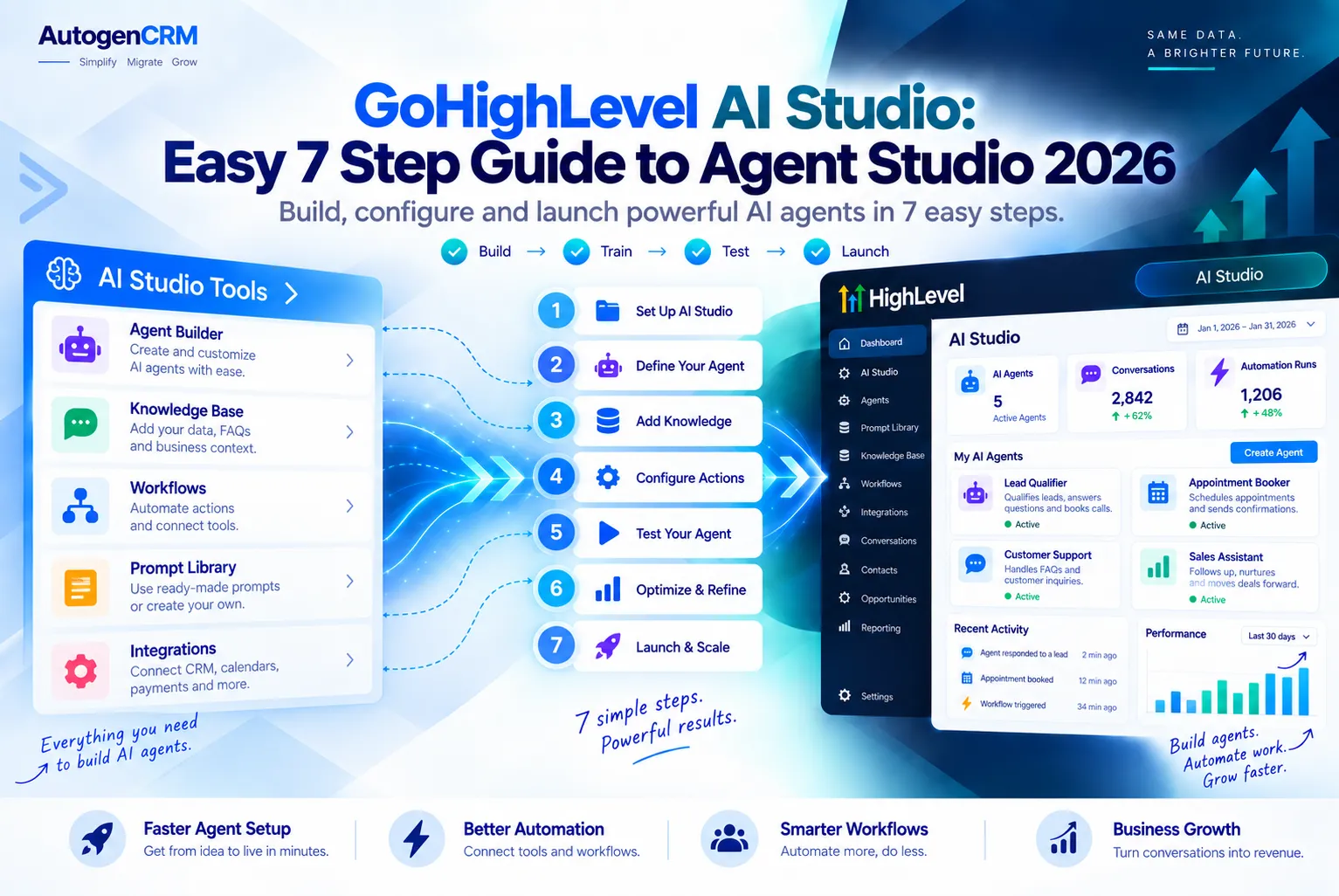
GoHighLevel AI Studio, called Agent Studio inside HighLevel, is the place where you build your own AI agents that think and take action in your CRM.
You can build them by drawing a flow on a canvas or by simply telling the builder what you want in plain words.
In this guide you will learn what GoHighLevel AI Studio does, its main features, how to build an agent in 7 easy steps, what it costs, and how it differs from AI Employee.
Every fact here was checked against the official HighLevel help center.
What Is GoHighLevel AI Studio?
GoHighLevel AI Studio is a builder for custom AI agents. HighLevel calls it Agent Studio, and you find it under AI Agents and then Agent Studio in your account.
Many users and ghl ai studio guides still use the older “AI Studio” name.
Inside GoHighLevel AI Studio, think of an agent as a smart helper with a job. One agent might sort new leads. Another might answer questions from your files. You decide what it knows, what tools it uses, and when it runs.
GoHighLevel AI Studio has grown fast. It now has two ways to build agents, and HighLevel has also renamed a few parts. Let’s clear that up first so the rest of the guide makes sense.
Flow Agents and Managed Agents
There are two kinds of agents. Flow Agents are built on a visual canvas where you drag boxes, called nodes, and link them together. This side of GoHighLevel AI Studio gives you full control over every path.
Managed Agents were first called Super Agents. You build them by chatting. You describe the goal, and HighLevel creates the agent for you. HighLevel now recommends Managed Agents for new builds, while old Flow Agents keep working with their triggers.
Key Features of GoHighLevel AI Studio
Here are the main features listed in the official Agent Studio overview and the multi agent builder guide.
- Visual canvas: Drag and drop nodes and connect them to plan your logic.
- Chat based builder: Describe what you want and let Managed Agents build it.
- LLM node: Writes smart replies based on the prompt you give it.
- Knowledge Base node: Lets the agent answer using your own documents.
- Web Search node: Pulls fresh facts from the internet.
- API and MCP tool nodes: Connect the agent to outside apps and services.
- Conditional routing: Sends the agent down different paths based on rules or the intent of a message.
- Variables: Pass data between nodes, plus global variables for things like API keys.
- Test tab: Try the agent before real customers ever see it.
- Versions: Draft, Staging, and Production modes, with one click publishing and rollback.
Managed Agents add their own skills. They can answer questions, take CRM actions like adding tags or updating fields, start workflows, and even create images, audio, or video.
Where Agents Can Run
Agents in GoHighLevel AI Studio only run when a trigger fires. HighLevel lists triggers such as chat messages, form submissions, and tags being added to a contact. Without a trigger, the agent will not do anything.
Managed Agents can work across website chat, SMS, email, and social messages. Flow Agents can also be called through the HighLevel API once they are in Production.
New to GoHighLevel? Try it free for 30 days
Get HighLevel's official 30-day free trial and free Bootcamp through our partner link (the standard trial is 14 days). Prefer it done for you? We set up GoHighLevel from $499, with a free website.
Start 30-day free trialHave us set it upPartner link: we may earn a commission at no extra cost to you. Disclosure
How to Build an Agent in GoHighLevel AI Studio (7 Steps)
This is the simplest path for a new agent, based on the official Managed Agents setup guide. It works well even if you have never built an AI tool before.
- Open Agent Studio. Go to AI Agents, then Agent Studio, then click the Managed Agents tab.
- Click Create Agent. Describe the goal in plain words. Say which channels it should use, which Knowledge Base it should read, and what CRM actions it may take.
- Review the summary. HighLevel shows a plan of what it built. Chat with it to fix anything that looks wrong.
- Add extra skills. Turn on media creation for images, audio, or video only if your agent needs it.
- Test it. Use the built in test panel. Try normal questions, odd questions, and rude questions.
- Publish. Once you are happy, publish the agent so it starts reacting to live events.
- Watch and improve. Check how it performs each week and tweak the instructions as you learn.
Building a Flow Agent Instead
Want more control? Flow Agents use the canvas. You add nodes, link them with lines called edges, set your variables, and test in the Test tab.
When the flow works, save it to Staging. After one more check, promote Staging to Production. This two stage setup stops half finished changes from reaching your customers.
Tips for a Better Agent
- Give the agent one clear job. Small agents are easier to test and fix.
- Keep your Knowledge Base clean and up to date. Old files lead to wrong answers.
- Write a short global prompt that sets the tone, like friendly and brief.
- Always test edge cases before you publish.
GoHighLevel AI Studio Pricing
GoHighLevel AI Studio pricing is the part that confuses most people, so let’s keep it simple. The official HighLevel AI product pricing page says Agent Studio is pay per use across all plans and is not bundled into a subscription.
The multi agent builder guide adds that you can build unlimited agents for free. Knowledge Base use and steps that do not call AI are free too. You only pay for AI model tokens at standard rates.
The Managed Agents guide also lists monthly run limits on AI Employee plans. Here is how it all fits together.
| Plan or Item | Price | What It Means for Agent Studio |
|---|---|---|
| Pay Per Use | No monthly fee | You pay only for AI tokens your agents use |
| AI Employee Growth | $50 per month per location | Managed Agents guide lists 100 runs per month |
| AI Employee Unlimited | $97 per month per location | Managed Agents guide lists 1,000 runs per month, plus 3x Ask AI and AI Studio usage |
| Building agents | Free | Unlimited agents, free Knowledge Base and non AI steps |
Token rates depend on the AI model you pick. For example, HighLevel lists some models at $0.25 per 1 million input tokens and others at $2.00 per 1 million input tokens.
Prices change often, so always check the official pricing page before you quote a client.
For a full look at plan costs, read our GoHighLevel pricing guide.
Best Use Cases for GoHighLevel AI Studio
Here are smart ways agencies and local businesses can put GoHighLevel AI Studio to work.
- Lead sorting: When a form comes in, the agent reads it, scores the lead, adds a tag, and starts the right workflow.
- Help desk answers: Connect your FAQ files to a Knowledge Base so the agent gives correct answers fast.
- Research helper: Use web search to gather facts about a new prospect before a sales call.
- Data cleanup: Let an agent fix contact fields and remove messy entries.
- Content drafts: Have an agent write social posts or simple images for review.
- App connections: Use API or MCP nodes to send data to tools you already use.
Start with one task that eats your team’s time every day. Build an agent for that one task, prove it works, then add more.
GoHighLevel AI Studio vs AI Employee
This is a common mix up. AI Employee is HighLevel’s paid bundle of ready made AI tools. It includes Conversation AI, Voice AI, Reviews AI, Content AI, and more.
GoHighLevel AI Studio is a builder. Instead of using a ready made bot, you design your own agent with its own steps, tools, and rules.
| Feature | Agent Studio | AI Employee |
|---|---|---|
| What it is | Builder for custom agents | Bundle of ready made AI tools |
| Setup | Canvas or plain language chat | Turn on and configure each tool |
| Best for | Custom tasks and internal work | Chatting, calling, reviews, content |
| Pricing | Pay per use tokens | $50 or $97 per month, or pay per use |
HighLevel’s own comparison article gives a handy rule. Use Conversation AI when you want a bot to reply to your customers. Treat a Managed Agent as a member of your team that does work behind the scenes.
Want to go deeper into the bundle? See our GoHighLevel AI Employee guide.
Is GoHighLevel AI Studio Worth It?
For most agencies, GoHighLevel AI Studio is worth it. Building agents is free, so you can test ideas without a big bill. You only pay when the agent actually uses AI.
The main downside is the learning curve for Flow Agents. Canvas logic takes time to learn. Managed Agents fix much of this, since you build by talking instead of drawing.
It also helps to keep an eye on token costs. A busy agent on a strong model can add up. Pick a smaller model for simple jobs to keep costs low.
Who Should Use It
- Agencies that want to sell custom AI setups to clients.
- Local businesses with repeat tasks like lead follow up and FAQs.
- Teams already using HighLevel workflows who want smarter automation.
Final Thoughts
GoHighLevel AI Studio turns HighLevel from a CRM into a place where you can build your own AI team. Start with one Managed Agent, give it one clear job, test it well, and grow from there.
If you do not have HighLevel yet, you can try GoHighLevel here and explore Agent Studio yourself. If you would rather have experts set it up, the AutoGenCRM team can build, test, and launch your agents for you.
Ready to Get Your GoHighLevel System Built?
We'll build your entire GHL setup for $499 and give you a free professional website.
Book a Free Call See Packages & PricingOr call +1 (681) 276-7045 · Mon–Fri, 9 AM–5 PM ET