Last updated:
Ready to Try GoHighLevel?
Get the all-in-one platform for CRM, automations, funnels & websites — built for agencies.
Start your free trial and explore every feature.
UgenticIQ AI is a no code tool that lets you build AI agents that write and work in your own voice. You train each agent on your content, give it a task, and it does the work for you. This guide shows you how to use UgenticIQ AI step by step, from your first agent to a full content routine.
Want the price, pros and cons instead? Read our full UgenticIQ review. This post is all about using the tool well.
What UgenticIQ AI Agents Actually Do
An AI agent is different from a chatbot. A chatbot answers one question and stops. An agent takes a full job, works through it in steps, and hands you the result.
Ugentic AI, the company behind the tool, launched it on September 4, 2025. The official launch announcement gives a clear example. An agent can research restaurants in Chicago, find their contact details, check their social pages, and write a personal email to each one.
The same release says one agent can even judge the work of another agent. That gives you a simple quality check before anything reaches you.
The Three Main Parts
From the official pages, UgenticIQ AI has three main parts you will use every day.
- The builder: A drag and drop editor where you add and arrange agents. No code is needed.
- The training area: Where you upload your emails, posts, videos and courses so agents learn your style.
- Prebuilt agents: Ready made helpers for emails, social posts, video scripts, ads and more.
Before You Start: What You Need
Good input gives good output. That is the most important rule with any voice trained tool. Gather these things before you log in.
- 10 to 20 of your best emails or newsletters.
- A batch of social posts that got good results.
- Video transcripts, webinar notes or course lessons.
- A short note about your audience, offer and tone.
If you have very little content, the agent has less to learn from. In that case, write a few sample pieces by hand first. Then use them as training material.
New to GoHighLevel? Try it free for 30 days
Get HighLevel's official 30-day free trial and free Bootcamp through our partner link (the standard trial is 14 days). Prefer it done for you? We set up GoHighLevel from $499, with a free website.
Start 30-day free trialHave us set it upPartner link: we may earn a commission at no extra cost to you. Disclosure
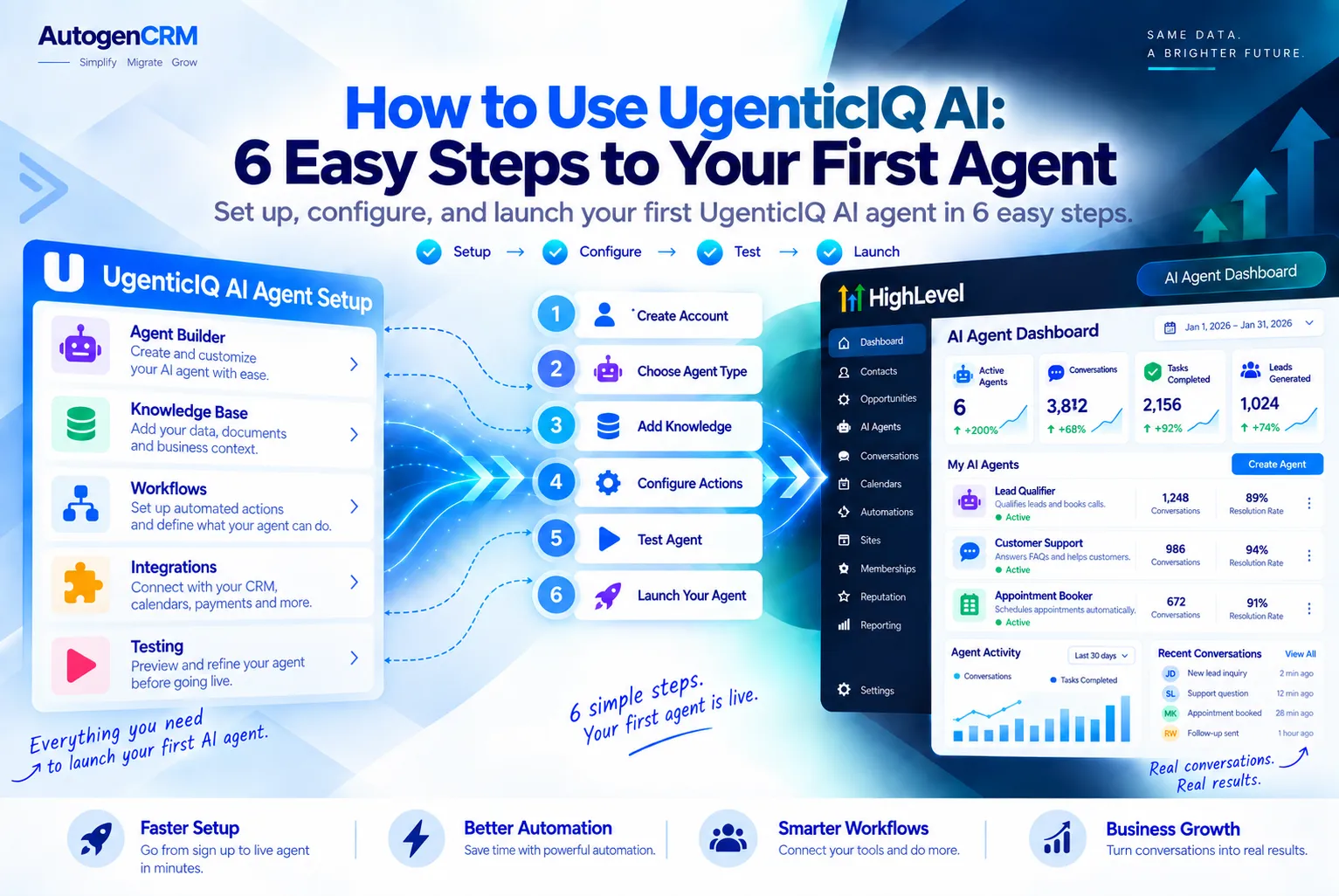
How to Use UgenticIQ AI in 6 Easy Steps
Here is a simple path to get your first agent working. Each step builds on the one before it.
- Create your account. Sign up on the official site and open your dashboard. Check their pricing page for current plan and trial details.
- Upload your training content. Add your emails, posts and transcripts to the knowledge area. Clean, on brand samples work best.
- Pick a prebuilt agent. Start with one simple role, like an email writer. Drag it into your workspace.
- Write clear instructions. Tell the agent who the audience is, what the goal is, and how long the output should be.
- Run a test task. Ask for one email or one post. Read it slowly and compare it to your real writing.
- Give feedback and repeat. Tell the agent what to fix. Reviewers note that it improves when you treat it like a teammate and correct it often.
How to Write Better Agent Instructions
Short, clear instructions beat long, vague ones. Use this simple formula for every task you give.
- Role: “You write my weekly newsletter.”
- Audience: “Readers are small agency owners.”
- Goal: “Get them to book a call.”
- Format: “Under 250 words, one link, friendly tone.”
Best UgenticIQ AI Use Cases for Marketers and Agencies
The launch release lists many use cases. These include social media, customer support, copywriting, email outreach, sales strategy, recruiting, SEO, YouTube work and data analysis. Here is how they map to real jobs.
| Task | What the Agent Does | Who Benefits Most |
|---|---|---|
| Email marketing | Drafts newsletters and follow up emails in your voice | Coaches and course creators |
| Social media | Writes daily posts for LinkedIn, Facebook and Instagram | Solo marketers |
| Video scripts | Turns ideas into YouTube and short video scripts | Creators |
| Ad copy | Writes ad ideas and sales page drafts | Agencies running paid ads |
| Cold outreach | Researches prospects and writes personal emails | Agencies finding new clients |
| Lead magnets | Drafts guides and checklists to collect leads | Small business marketers |
For Agencies
Agencies can use UgenticIQ AI to speed up first drafts for clients. Train one agent per client so each brand keeps its own tone. Then your team edits and approves instead of writing from a blank page.
For Solo Marketers
If you work alone, set up a small team of agents. One writes emails, one writes posts, and one writes scripts. This lets you post every day without writing every word.
How to Pair UgenticIQ AI With GoHighLevel
We could not find any official, native link between UgenticIQ AI and GoHighLevel. The tool does appear on the GHL Central Marketplace, but it is listed as a training resource and runs as its own separate platform.
So the safe way to pair them today is a simple handoff. UgenticIQ writes the words. GoHighLevel sends them, tracks the leads and books the calls.
A Simple Handoff Routine
- Ask your UgenticIQ agent for a week of emails and social posts.
- Review and edit the drafts so they are correct and on brand.
- Paste the emails into a GoHighLevel workflow as timed email steps.
- Schedule the posts in the GoHighLevel Social Planner.
- Let GoHighLevel tag leads, send reminders and book calls.
GoHighLevel also has its own AI built in, like Conversation AI for chat and Voice AI for calls. Our GoHighLevel AI Employee guide explains how those tools reply to leads for you.
A Sample Weekly Routine
A routine turns UgenticIQ AI from a fun test into a real time saver. Here is a simple plan you can copy and change to fit your week.
- Monday: Ask your UgenticIQ AI email agent for the week’s newsletter and two follow up emails.
- Tuesday: Ask the social agent for five posts based on the newsletter topic.
- Wednesday: Ask the script agent to turn the best post into a short video script.
- Thursday: Review everything, fix facts, and load it into your sending tools.
- Friday: Check what worked and add the winners back as new training content.
This loop matters. Each week, your best pieces go back into UgenticIQ AI as training. Over time the agents learn what your audience likes most.
How Much Time Can You Save?
We will not promise a number, because it depends on your content and how much you edit. The real gain is starting from a solid draft instead of a blank page. Track your own hours for two weeks to see the change.
Common Mistakes to Avoid
- Uploading old content that no longer matches your offer.
- Giving UgenticIQ AI one huge task instead of small, clear steps.
- Publishing drafts without a human review.
- Building too many agents before one works well.
Smart Tips to Get Better UgenticIQ AI Results
These tips come from how voice trained agents work and from what early reviewers report. They will save you time and edits.
- Start small. Master one agent before you add five more.
- Feed your best work only. Weak samples teach weak habits.
- Save winning instructions. Reuse prompts that gave great results.
- Use a reviewer agent. Let one agent check another before you read the draft.
- Always fact check. Never publish numbers or claims you have not confirmed.
- Update training often. Add new content so the agent keeps up with your offers.
Limits You Should Know
Every tool has limits. Knowing them up front stops surprises later.
- It needs your content. A hands on review by Matt McWilliams notes that solid input means great output, and weak input means weak output.
- It is not a CRM. It does not store leads, run pipelines or book appointments.
- You still need to edit. Agents speed up drafts, but a human should approve the final copy.
- It is a young product. Plans and features have changed since launch, so check the official site before you buy.
Quick Note on Price
Pricing has shifted since launch, so see our UgenticIQ review for the verified details.
Who Should Use UgenticIQ AI
UgenticIQ AI works best for people who already have a lot of content and want more of it, faster. Think coaches, course creators, and marketers who write every day.
It is a weaker fit if you need lead capture, booking and follow up in one place. For that job, a full platform like GoHighLevel is the better base. See our GoHighLevel features breakdown to compare what each covers.
Final Thoughts
UgenticIQ AI is easy to use once you follow a clear routine. Gather your best content, train one agent, write clear instructions, and correct it often. Then hand the finished words to a system that can send them and track results.
Your next step is simple. Build one email agent this week and test it on real work. If you want a place to run those emails, posts and follow ups, you can try GoHighLevel free and plug your content into a workflow.
Need help? The AutoGenCRM team sets up GoHighLevel workflows, snapshots and AI agents for agencies. Reach out and we will help you turn your AI content into booked calls.
Ready to Get Your GoHighLevel System Built?
We'll build your entire GHL setup for $499 and give you a free professional website.
Book a Free Call See Packages & PricingOr call +1 (681) 276-7045 · Mon–Fri, 9 AM–5 PM ET