Ready to Try GoHighLevel?
Get the all-in-one platform for CRM, automations, funnels & websites — built for agencies.
Start your free trial and explore every feature.
GoHighLevel landing page templates are pre-built page designs inside the GHL Funnel Builder and Site Builder that cover lead capture, appointment booking, webinar registration, VSL pages, and full niche funnels. They save hours of design work, but most templates ship with placeholder content, generic CTAs, and forms that aren’t connected to your CRM. This guide covers the best template types, how to customize them properly, and how the new HighLevel AI Studio is changing the way pages get built in 2026.
You imported a template. It looks great in the preview. You publish it. Form submissions go nowhere.
This is the most common GoHighLevel landing page issue. Templates are built for looks, not wired for your specific CRM setup.
This guide covers everything you need: what GHL landing page templates are, the best types by niche, the elements every high-converting page needs, how to customize templates without breaking them, and the new HighLevel AI Studio that lets you build full pages from a text prompt; all backed by a trusted GoHighLevel Agency Service.
What Are GoHighLevel Landing Page Templates?
GoHighLevel landing page templates are ready-made page designs built inside the GHL Funnel Builder and Site Builder. They give you a starting point so you don’t build every page from scratch.
A template includes the full layout, sections, copy blocks, images, forms, and CTA buttons. You replace the placeholder content with your own offer, connect the form to your pipeline, set the domain, and publish.
Templates come from three places inside HighLevel:
- Native GHL templates, built into the Funnel and Website builders
- GHL Marketplace snapshots, full funnels shared by other users
- Third-party snapshots, like the AutoGenCRM snapshot library, often pre-tested for conversion
Why Landing Page Templates Matter for Lead Generation
Templates speed up launch time and improve conversions when used right. Here’s why agencies and businesses rely on them:
- Faster launch. A polished page in 30 to 60 minutes instead of 3 to 5 hours from scratch.
- Proven structure. Good templates follow tested layouts (hero, benefits, social proof, CTA, FAQ).
- Mobile-ready. Templates are usually responsive out of the box.
- Lower cost per lead. A clean, fast page improves Google Ads Quality Score and Facebook ad relevance.
- Easy A/B testing. Duplicate a template, change one element, and split test.
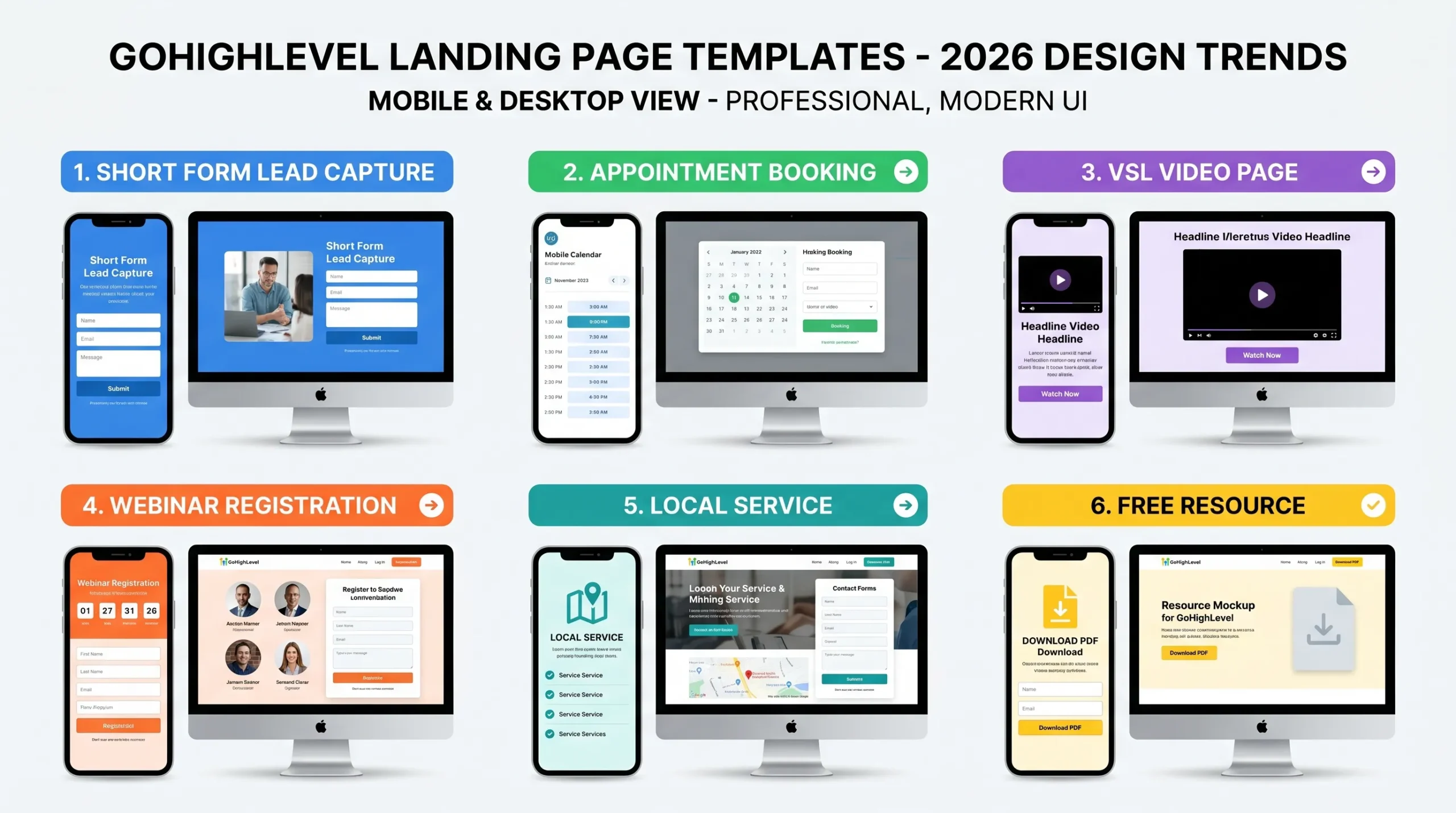
GoHighLevel Landing Page Template Types (And When to Use Each)
| Template Type | Best For | Key Element |
|---|---|---|
| Lead Capture (Short Form) | Cold ad traffic, list building | Above-fold form, single field |
| Appointment Booking | Warm traffic, retargeting, service businesses | Embedded calendar visible without scroll |
| VSL (Video Sales Letter) | High-ticket coaching and consulting | Video player above fold, no nav |
| Webinar Registration | Education-based marketing, courses | Date, time, urgency element |
| Lead Magnet / Free Resource | Building an email list | Resource preview image |
| Local Service Business | Plumbers, roofers, HVAC, dentists | Phone number sticky, service area |
| E-commerce Product Page | Single-product offers | Product gallery, reviews, order form |
Best Use Cases by Niche
Different niches need different template structures. Here’s what works for the most common GHL use cases.
Agencies
Use a booking funnel with a calendar embed and a short qualifier form. Skip long sales copy. Agencies sell trust through case studies and a quick consultation, not landing page essays.
Coaches and Course Creators
Use a VSL or webinar registration template. Long-form video does the selling. The page job is to capture the email and get the click to the next step.
SaaS
Use a free trial signup template with feature blocks, social proof, and a clear pricing summary. SaaS visitors compare. Make the trial offer obvious.
Real Estate
Use a lead capture template for buyer or seller leads. Short forms, location-specific headlines, and home value or property search hooks convert best.
Local Service Businesses
Use a local service template with a sticky call button, service area listed, and a quote request form. Most local visitors are mobile, so mobile layout matters more than desktop.
E-commerce
Use a single product landing page with image gallery, reviews, urgency element, and a one-step checkout. Skip menus and category pages on the landing page itself.
Elements of a High-Converting GoHighLevel Landing Page
Every high-performing GHL landing page has these elements. If a template is missing any of these, add them before publishing.
- Specific headline. “Get Your Roof Inspected in 24 Hours, No Deposit Required” beats “Get Your Free Quote Today” every time. Specific beats generic.
- Single, clear CTA. One action per page. Multiple CTAs split attention and lower conversion.
- Mobile-first layout. Most traffic is mobile. Check mobile preview before publishing, not after.
- Above-fold form or button. Visitors should not scroll to find the action.
- Social proof. Testimonials, review counts, logos of past clients, or case study results.
- Trust signals. Privacy link, business name, contact info, and a real photo of you or your team.
- Benefit-driven copy. Talk about the result, not the feature. “Save 6 hours a week” beats “Built-in automation tools.”
- FAQ section. Answers the top 3 to 5 objections that stop people from converting.
- Fast load speed. Compress images. Skip heavy video backgrounds on mobile.
- Confirmation action. Set what happens after submit: redirect, thank-you message, or calendar booking.
How to Customize a GoHighLevel Landing Page Template (Step by Step)
- Import the template. Go to Funnels → Add New Funnel → From Template. Or for websites, Sites → Funnels → New.
- Replace the headline first. This is the highest-impact change. Make it specific to your offer.
- Connect the form to your pipeline. Click the form element → Edit → set Pipeline, Pipeline Stage, and any Workflow trigger. Without this, leads land in Forms → Submissions but never enter your CRM pipeline.
- Set the calendar connection if it’s a booking template. Click the calendar element → Edit → select your sub-account calendar from the dropdown.
- Replace placeholder images. Stock photos that come with templates signal “template” to visitors. Use your own photos or licensed images.
- Check mobile view. Switch to mobile preview in the builder. Verify the headline, form, and CTA are visible without scrolling.
- Set the custom domain. Funnels → Settings → Domain. Do this before running any paid traffic. If you change the domain later, your ad URLs break.
- Set the confirmation action. What happens after form submit: redirect to a thank-you page, show inline confirmation, or trigger a booking.
- Test the full flow. Submit the form yourself. Check that the contact appears in your CRM. Check that any automations fire correctly.
- Publish. Then run a small traffic test (50 to 100 visitors) before scaling spend.
Common Errors and Quick Fixes
Form submissions not showing in CRM: The form is on the page but not connected to a pipeline. Open the form element editor and set Pipeline, Pipeline Stage, and a Workflow trigger.
Calendar shows wrong availability: The calendar is still linked to the template creator’s test calendar. Click the calendar element, edit it, and select your own sub-account calendar.
CTA button doesn’t go anywhere: Click the button → Edit → set the action to either a URL, the next funnel step, or a form submit. Default templates often have placeholder links.
Mobile layout broken: Hero images often push the form below the fold on mobile. Either remove the hero image on mobile only (mobile visibility setting) or shrink it.
HighLevel AI Studio: How AI Is Changing Template Creation in 2026
This is the biggest shift in GHL page building this year.
HighLevel AI Studio is an AI-powered builder available inside HighLevel Labs. Instead of picking a template and editing it block by block, you describe what you want in plain English. AI Studio generates the layout, copy, and images for you.
What AI Studio Can Build
- Full landing pages from a text prompt
- Multi-page websites
- Booking funnels with native calendar integration
- Interactive quizzes with lead capture at the end
- Multi-step surveys and branded forms
- Custom AI-generated images for your pages
Three Ways to Build With AI Studio
- Prompt-based: Describe what you want. Example: “Create a landing page for a dental clinic with online booking, patient testimonials, and a free consultation offer.”
- URL-based: Paste a public URL. AI Studio extracts the visual theme and layout to recreate the design inside HighLevel.
- Image-based: Upload a screenshot for visual inspiration. AI Studio uses it as creative direction.
How to Enable AI Studio
- Log into your HighLevel sub-account
- Go to Settings → Labs
- Toggle on AI Studio
- You’ll see a new AI Studio option in your sidebar
AI Studio Pricing
AI Studio is currently free while in Labs/beta. According to HighLevel, pricing is expected to evolve once it exits beta. For now, you can build unlimited pages at no extra cost beyond your standard GHL plan.
What AI Studio Is Good At, And Where It Falls Short
Good at:
- Generating a full structured page in under a minute
- Creating on-brand layouts from a reference URL
- Producing AI-generated images that match your prompt
- Iterating fast with follow-up commands like “make the hero image bigger” or “add a testimonial section”
Limitations:
- AI Studio projects live inside AI Studio. They can’t be moved into the standard Sites or Funnels builders.
- URL recreation is inspiration-level, not a one-to-one copy.
- Forms and calendars often need manual connection steps to wire into your CRM data.
- Still in beta, so behavior may change.
Templates vs Custom-Built Pages: Which Should You Use?
| Use a Template When | Build Custom When |
|---|---|
| You need to launch fast (under 1 hour) | You need a unique brand experience |
| You’re testing an offer for the first time | You have specific data on what your audience converts on |
| The niche is standard (coaching, agency, local service) | Your offer doesn’t fit any standard template |
| You don’t have design skills or budget | You have an in-house designer or copywriter |
For most GHL users, the best approach is: start with a template, then customize the headline, copy, images, and CTAs to match your offer. Build custom only when templates clearly don’t fit.
A/B Testing Your GoHighLevel Landing Pages
If you have 500+ visitors per week
Run a real split test. GHL’s split testing is in Funnels → your funnel → Split Testing. Duplicate a page, change one element (not multiple), set the traffic split to 50/50, and let it run until each variant has at least 100 conversions.
If you have under 500 visitors per week
Don’t split test. You won’t reach statistical significance, and the results will mislead you. Instead, change one element at a time on your single page and compare week to week. Focus on:
- Headline (biggest single-element impact)
- Form position (above vs below fold)
- CTA button text
- Hero image presence or removal
Common Mistakes to Avoid
1. Publishing without a custom domain. The default GHL subdomain looks unprofessional and breaks ads if you change it later. Set the domain before any paid traffic.
2. Leaving navigation links on ad landing pages. Nav menus give visitors an escape route. Strip all navigation from pages running paid traffic.
3. Skipping the mobile preview. Most visitors are on mobile. If your form is below the fold on mobile, you’re losing leads.
4. Using generic placeholder headlines. “Welcome to Our Service” or “Get Started Today” lose to specific, benefit-driven headlines.
5. Forgetting to connect the form to a pipeline. Submissions land in Forms but never enter your CRM workflow.
6. Not testing the full flow before running ads. Submit the form yourself. Check the contact lands in your pipeline. Check automations fire.
7. Stuffing the page with too many CTAs. One page, one action. Multiple CTAs split attention and tank conversion.
Free Bonus: 10 Best-Designed GoHighLevel Funnel Snapshots
Get instant access to 10 of the highest-converting GHL funnel snapshots, ready to import into your account:
- Women Digital Products Funnel, for course creators selling to female audiences
- Business Event Funnel, for live and virtual events
- Course Funnel, for online course launches
- Fitness Funnel, for personal trainers and fitness coaches
- Golden Funnel, high-converting general purpose template
- Local Business Funnel, for plumbers, roofers, HVAC, dentists, and other local services
- The Creator Funnel, for content creators and personal brands
- Virtual Event Funnel, for online summits and live training
- VSL Video Funnel, for high-ticket coaching and consulting
- Webinar Funnel, for education-based marketing
The Real Issue Most Template Guides Miss: The Headline
Most GHL template guides obsess over design and form connections. The headline gets a single line at the bottom.
That’s backwards.
The headline is the single highest-impact element on any landing page. A specific, benefit-driven headline outperforms a generic one by a wide margin, often more than any layout change, button color, or image swap.
A template’s default headline (“Get Your Free Quote Today”) is written to fit any business. That’s exactly why it doesn’t work for yours.
Before you optimize anything else, rewrite the headline. Make it:
- Specific to your offer
- Benefit-driven (the result, not the feature)
- Time-bound if possible (24 hours, this week, today)
- Risk-reducing if relevant (no deposit, no contract, free)
Example transformation:
Generic: “Get Your Free Roofing Quote”
Specific: “Free Roof Inspection in 24 Hours, No Deposit, No Pressure”
The second version converts because it tells the visitor exactly what they get, when they get it, and what risk they’re taking. Zero, in this case.
For pre-optimized landing pages with tested headlines built in, see our snapshot library and the agency setup guide.
Related GoHighLevel Guides
Frequently Asked Questions
Where do I find GoHighLevel landing page templates?
GoHighLevel landing page templates live inside the Funnel Builder: Funnels → Add New Funnel → From Template. The library is categorized by industry and funnel type. You can also access more templates through the GHL Marketplace and third-party providers like AutoGenCRM that offer pre-tested, conversion-optimized snapshots.
What is HighLevel AI Studio and is it free?
HighLevel AI Studio is an AI-powered builder inside HighLevel Labs. You describe what you want in plain English and AI Studio generates the page, copy, layout, and images. It’s currently free while in Labs/beta. Pricing is expected to evolve when it exits beta. To enable it, go to Settings → Labs and toggle it on.
Can I use GoHighLevel landing pages for Google Ads?
Yes. GHL landing pages work with Google Ads traffic. To stay compliant, include a privacy policy link, your business name and contact info, and make sure the page content matches your ad copy. Optimize images and check page speed in Google PageSpeed Insights before scaling ad spend.
How do I add a GoHighLevel calendar to a landing page template?
In the GHL page builder, drag the Calendar element onto your page. Click the element to edit it and select your sub-account calendar from the dropdown. Set the calendar to display the booking form inline (embedded) instead of redirecting to a separate URL. Embedded calendars convert better. Set the confirmation action (redirect or inline message) in the calendar settings.
Should I use a template or build a custom page?
Use a template if you need to launch fast, you’re testing an offer, or your niche is standard. Build custom only when your offer doesn’t fit any template and you have specific conversion data to work from. For most users, customizing a strong template beats building from scratch.
How long does it take to customize a GHL landing page template?
Starting from a template, expect 30 to 60 minutes for a fully customized, form-connected, mobile-checked, ready-to-publish page. Starting from a blank canvas takes 2 to 4 hours. AI Studio can produce a starter page in under a minute, but you’ll still spend time refining copy and connecting forms and calendars.
What is the difference between a GHL funnel and a website?
A funnel is a single-purpose conversion path, usually one to three pages, designed to drive a specific action (book, opt-in, buy). A website is a multi-page presence with navigation, blog, and multiple service pages. GHL templates exist for both. Use funnels for ad traffic. Use websites for organic and brand traffic.
Can AI Studio replace traditional templates?
Not entirely. AI Studio is great for fast first drafts and getting structure quickly. But AI Studio projects live in their own workspace and can’t move into the standard Sites or Funnels builders. For pages where you need full control, deep CRM integration, or proven conversion structure, traditional templates and pre-tested snapshots still win.
Article verified and updated for 2026.
Ready to Get Your GoHighLevel System Built?
We'll build your entire GHL setup for $499 and give you a free professional website.
Contact Us Now