Ready to Try GoHighLevel?
Get the all-in-one platform for CRM, automations, funnels & websites — built for agencies.
Start your free trial and explore every feature.
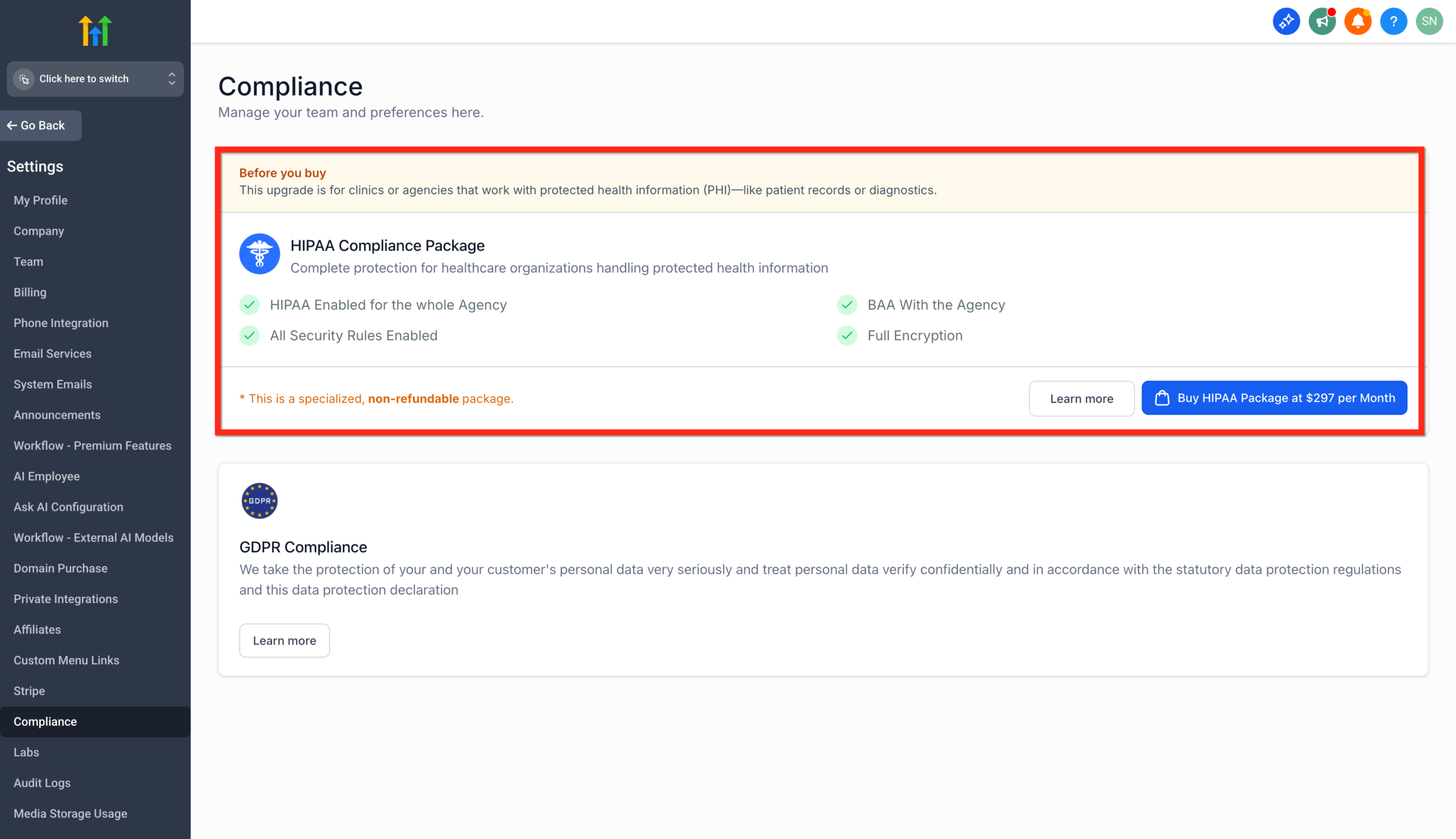
GoHighLevel is not HIPAA compliant by default. To make it HIPAA-compliant, you buy the optional HIPAA add-on for $297 per month (or $2,970 per year) on top of your base plan. The add-on adds AES-256 encryption for ePHI, a signed BAA, audit logging, role-based access, and MFA enforcement. It works with any GHL plan ($97, $297, or $497). It activates within 48 to 72 hours after the BAA is signed. Two things to know up front: the HIPAA add-on cannot be canceled, refunded, or downgraded once enabled, and buying it does not make your overall practice HIPAA-compliant. Your agency still needs its own policies, training, and BAAs with your healthcare clients.
You have a healthcare client. They need HIPAA compliance. You’re not sure if GHL qualifies.
The honest answer in three lines:
- GHL is not HIPAA-compliant by default. The standard $97, $297, and $497 plans do not handle PHI in a HIPAA-eligible way.
- GHL has a paid HIPAA add-on at $297/month that adds the technical safeguards and gives you a Business Associate Agreement.
- Buying the add-on doesn’t make your agency HIPAA-compliant. Your agency still needs its own HIPAA policies, training, risk assessment, and BAAs with your clients.
This guide covers exactly what the HIPAA add-on includes, what it costs, how it activates, and what you still need to handle on your side.
What HIPAA Compliance Means in GoHighLevel
At AutogenCRM, HIPAA stands for the Health Insurance Portability and Accountability Act. It sets data privacy and security rules for handling Protected Health Information (PHI) and electronic PHI (ePHI).
In a CRM context, HIPAA compliance means:
- Patient data is encrypted at rest and in transit
- Access is controlled and logged
- The platform vendor signs a Business Associate Agreement (BAA) accepting legal responsibility for safeguarding ePHI
- You have audit trails showing who accessed what and when
- Multi-factor authentication is enforced to prevent unauthorized access
GoHighLevel partnered with The Compliancy Group to build out the HIPAA Privacy Rule and Security Rule safeguards needed to qualify as a HIPAA Business Associate. But these safeguards only activate if you buy the HIPAA add-on. They are not on by default.
How the GoHighLevel HIPAA Add-On Works
The HIPAA add-on is a separate paid module. It is not bundled into any plan tier. You can add it to any subscription level, including the cheapest $97/month Starter plan.
Here are the key facts every agency needs to know before buying:
1. It applies account-wide. Once you enable HIPAA, every sub-account under your agency becomes HIPAA-enabled. You cannot pick and choose which sub-accounts are covered.
2. It cannot be canceled or refunded. This is the most important fact in this entire article. Once activated, the HIPAA add-on is permanent. The only way to remove it is to delete your entire GHL agency account. There is no downgrade path.
3. Activation takes 48 to 72 hours. After purchase and BAA signing, GHL activates the safeguards on your account. The faster you sign the BAA, the faster activation completes.
4. The BAA is managed inside GHL. No DocuSign chase. The BAA is sent and signed inside GHL Documents and Contracts. You can update signer details directly in the platform without contacting support.
5. Only your agency-GHL relationship is covered. The BAA from GHL covers GHL’s role as a Business Associate to your agency. You still need to provide your own BAA to your healthcare clients.
Current Price and Activation Process
| Detail | Information |
|---|---|
| Add-on price | $297/month (or $2,970/year, saving roughly 2 months) |
| Plan eligibility | Any plan: Starter ($97), Unlimited ($297), or SaaS Pro ($497) |
| Total monthly cost | $394 to $794 depending on base plan |
| Activation time | 48 to 72 hours after BAA signing |
| Cancellation | Not possible. Permanent once enabled. |
| Refund policy | No refunds available |
| Trial available | No HIPAA trial. Active paid subscription required. |
How to Activate HIPAA Compliance in GoHighLevel
- Log into your GHL agency account
- Go to Services and Marketplace (or contact GHL support)
- Select HIPAA Compliance
- Confirm the $297/month charge and add a payment method
- Provide BAA signer details
- Sign the BAA inside GHL Documents and Contracts
- Wait 48 to 72 hours for automatic activation
- Receive confirmation email and signed BAA copy
That’s it. There is no manual switch to flip after the BAA is signed. Activation is automatic once the BAA is countersigned by GHL.
What the HIPAA Add-On Includes
Business Associate Agreement (BAA). Signed and managed inside GHL. This is the legal document that allows GHL to process and store ePHI on your behalf.
AES-256 encryption with key rotation. All ePHI is encrypted at rest in the database. GHL automatically encrypts data before writing it to disk.
Audit logging. Records of user activity, access events, and data interactions. Required for HIPAA technical safeguards.
Role-based access controls. The HIPAA add-on enforces a least-privilege access model, meaning users only see the data they need for their role.
Multi-factor authentication (MFA). Mandatory for all users in a HIPAA-enabled account. No exceptions, no opt-out.
In-app compliance document management. Store BAAs, policies, and compliance documents inside GHL.
Editable BAA signer details. Update signer information directly in GHL without contacting support.
What the HIPAA Add-On Does Not Cover
This is where most agencies get into trouble. The HIPAA add-on covers GHL’s portion of the compliance chain. It does not cover yours.
1. Your agency’s own HIPAA compliance. You need a designated HIPAA compliance officer, written policies, staff training, and a documented risk assessment. The HIPAA add-on does none of this for you.
2. BAAs with your clients. GHL’s BAA covers GHL as a Business Associate of your agency. You still need to sign your own BAA with each healthcare client (the Covered Entity). Without that, the chain is broken.
3. Third-party integrations. If you connect Zapier, a non-HIPAA email service, or any third-party analytics tool, those tools need their own BAA with you. GHL’s HIPAA mode does not extend to data once it leaves the platform.
4. Devices and endpoints. Computers, phones, and tablets used to access GHL must have their own security controls. HIPAA requires endpoint security as part of the technical safeguards.
5. Data outside GHL. If patient data also flows through your email system, scheduling software, or billing platform, those systems need their own HIPAA compliance separately.
6. Operational practices. What you actually put in SMS messages, emails, and forms still matters. The platform can be HIPAA-compliant while your usage is not. For example, sending detailed patient diagnoses by SMS is risky regardless of the platform.
Why Agencies Still Need Their Own Compliance Program
This is the single biggest misunderstanding about GHL HIPAA mode.
Buying the $297/month add-on does not make your agency HIPAA-compliant. It makes GHL HIPAA-eligible to handle ePHI on your behalf. Two completely different things.
To be HIPAA-compliant as an agency, you also need:
- A designated HIPAA compliance officer (a real person on your team)
- Documented HIPAA policies and procedures
- Annual staff training on HIPAA rules
- A formal risk assessment of all systems handling PHI
- Breach response procedures and documentation
- BAAs signed with every client whose patients’ PHI you touch
- BAAs signed with every other vendor that touches that PHI (email, hosting, etc.)
- Endpoint security on all devices used to access PHI
Most agencies underestimate this. They assume the $297/month covers them. It doesn’t. If a HIPAA audit happens, GHL’s add-on protects GHL. Your agency is a separate liability.
If you serve healthcare clients seriously, work with a HIPAA compliance consultancy like The Compliancy Group or HIPAA One. They handle the policies, training, and certification side that the GHL add-on does not.
Who Should Use HIPAA Mode and Who Should Not
This decision is more nuanced than most articles admit.
Buy the HIPAA Add-On If
- Your agency stores, processes, or transmits actual PHI inside GHL (patient names tied to clinical conditions, treatment information, diagnoses, lab results, billing with insurance details)
- You manage patient appointment systems where the appointment type reveals clinical information
- You handle patient intake forms with health-related questions
- Your client is a Covered Entity (healthcare provider, health plan, or healthcare clearinghouse) and they require a BAA from you
- Your healthcare client portfolio justifies the $297/month minimum cost
Skip the HIPAA Add-On If
- You only run general marketing for healthcare clients (ads, brand awareness, website traffic) without touching patient data
- Your work is limited to lead capture (name and email only) where leads call the practice directly to book
- Appointment reminders contain no PHI (just date and time, no condition or treatment type)
- You have one healthcare client and the math doesn’t work yet ($297/month adds $3,564/year of fixed cost)
- You can route PHI workflows to your client’s existing EHR system instead of GHL
The “Marketing Only” Strategy
For small agencies with one or two healthcare clients, the smartest move is often to use GHL for marketing only and route any actual PHI to the client’s existing EHR.
What this looks like in practice:
- Use GHL for ads, lead capture (name + phone only), and basic appointment reminders
- Once a lead becomes a patient, hand them off to the client’s EHR or practice management system
- Never store treatment notes, diagnoses, or insurance details in GHL
- Names alone are not PHI; names tied to a healthcare context can be
This avoids the $297/month add-on cost while keeping your work compliant. Confirm this approach with a HIPAA compliance attorney before relying on it.
Cost Math: Total Monthly GoHighLevel + HIPAA
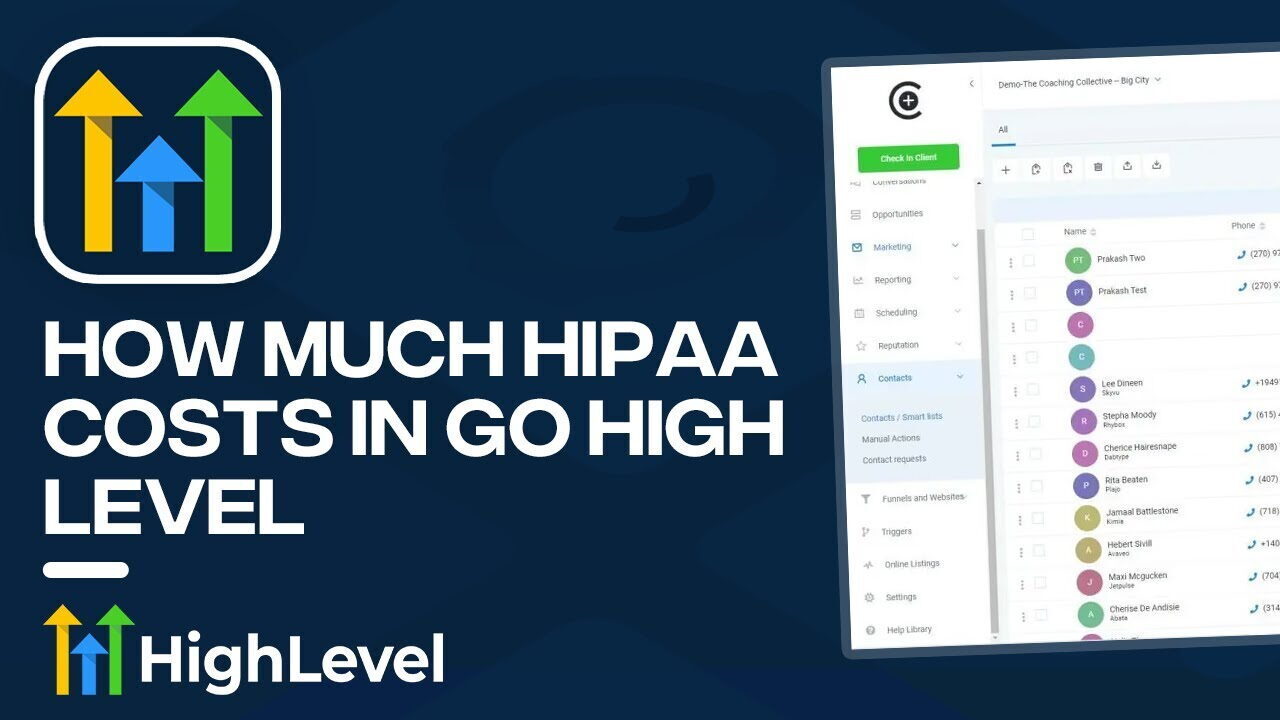
| Base Plan | Plan Cost | + HIPAA Add-On | Total/Month | Total/Year |
|---|---|---|---|---|
| Starter | $97 | +$297 | $394 | $4,728 |
| Unlimited | $297 | +$297 | $594 | $7,128 |
| SaaS Pro | $497 | +$297 | $794 | $9,528 |
Annual billing on the HIPAA add-on saves you about $594 per year ($2,970/year vs $3,564 monthly).
For agencies serving healthcare clients, the math typically works at 2 or more paying clients on a productized monthly retainer. One client at $1,000/month barely covers the GHL stack plus your time. Three clients at $1,500/month each starts to look profitable.
Common Mistakes That Break HIPAA Compliance
1. Putting PHI in SMS appointment reminders. “Reminder: Mr. Smith, your colonoscopy is at 2 PM tomorrow” is a HIPAA violation waiting to happen. Use generic reminders: “Reminder: your appointment is tomorrow at 2 PM.”
2. Including treatment details in review request follow-ups. “How was your treatment for [specific condition]?” mentions PHI in a non-encrypted channel. Keep review requests generic.
3. Connecting non-HIPAA integrations. Zapier, generic email tools, basic analytics platforms. Each integration needs its own BAA. Map every data flow before connecting anything to a HIPAA-enabled account.
4. Sharing logins between staff. Shared logins break the audit trail. Every user needs their own account with role-based access.
5. Skipping staff training. The technical safeguards work only if your staff doesn’t paste PHI into a Slack channel or email it to themselves. Training is mandatory under HIPAA.
6. Forgetting endpoint security. A laptop logged into GHL without disk encryption is a HIPAA gap. Every device that touches PHI needs its own security controls.
The Bottom Line on GoHighLevel HIPAA Compliance
GHL gives you the tools. HIPAA compliance is your job.
The $297/month add-on is real, useful, and necessary for any agency seriously handling PHI inside GHL. It includes encryption, audit logs, MFA, role-based access, and a signed BAA. The activation process is clean. The BAA management is built into the platform.
But three things will get you in trouble if you misunderstand them:
- Buying the add-on doesn’t make your agency HIPAA-compliant. You still need policies, training, risk assessments, and BAAs with your clients.
- It cannot be canceled. Once you enable it, you pay $297/month forever or you delete the entire account. Make sure you actually need it before activating.
- It only covers GHL. Every other system touching that data needs its own HIPAA compliance.
For most small agencies with one healthcare client, the better move is to keep GHL for marketing only and route PHI through the client’s existing EHR. For agencies seriously building a healthcare niche, the HIPAA add-on plus a real compliance program is the only way to do it right.
Talk to a HIPAA compliance attorney before activating, not a GHL expert. The technical setup is the easy part. The legal and operational compliance is where most agencies get exposed.
Article verified and updated for 2026.
Frequently Asked Questions
Is GoHighLevel HIPAA compliant by default?
No. GoHighLevel is not HIPAA-compliant by default. Standard accounts on Starter ($97), Unlimited ($297), and SaaS Pro ($497) plans do not handle PHI in a HIPAA-eligible way. To make GHL HIPAA-compliant, you must purchase the optional HIPAA add-on for $297/month and sign a Business Associate Agreement (BAA).
How much does GoHighLevel HIPAA compliance cost?
The GoHighLevel HIPAA add-on costs $297 per month or $2,970 per year. This is on top of your base subscription. Total monthly cost ranges from $394 (Starter + HIPAA) to $794 (SaaS Pro + HIPAA). Annual billing saves about two months of fees.
Can I cancel the HIPAA add-on after I activate it?
No. The HIPAA add-on is permanent once activated. It cannot be canceled, refunded, or downgraded. The only way to remove it is to delete your entire GoHighLevel agency account. Confirm you actually need HIPAA compliance before activating.
Which GHL plans support HIPAA compliance?
Any plan supports the HIPAA add-on. You can add it to Starter ($97), Unlimited ($297), or SaaS Pro ($497). The add-on is a separate $297/month module, not a feature locked behind a higher tier.
Does buying the HIPAA add-on make my agency HIPAA compliant?
No. The add-on makes GoHighLevel HIPAA-eligible to handle ePHI on your behalf. Your agency must achieve its own HIPAA compliance separately, including policies, staff training, a designated compliance officer, risk assessment, and BAAs with your healthcare clients. The platform is one piece of HIPAA compliance, not all of it.
What does the HIPAA add-on include?
The HIPAA add-on includes a signed BAA managed inside GHL, AES-256 encryption with key rotation, audit logging, role-based access controls, mandatory multi-factor authentication, and in-app compliance document management. It applies account-wide to every sub-account under your agency.
How long does HIPAA activation take?
Activation typically completes within 48 to 72 hours after the BAA is signed. The faster you complete the BAA signing inside GHL Documents and Contracts, the faster activation finishes. Once activated, you receive a confirmation email and a signed copy of the BAA for your records.
Do I still need a BAA with my healthcare clients?
Yes. GHL’s BAA covers GHL as a Business Associate of your agency. You also need to sign your own BAA with each healthcare client (the Covered Entity). Without your client BAA, the compliance chain is broken regardless of what GHL does on its end.
Can I use Conversation AI and Voice AI with HIPAA mode?
This is a usage question, not a platform question. The HIPAA add-on adds the technical safeguards. How you use AI features with patient data is your responsibility. Avoid putting PHI into AI prompts or chat messages unless you have specifically verified that flow is HIPAA-eligible. When in doubt, route AI interactions through generic appointment scheduling logic with no PHI in the conversation content.
Should I activate HIPAA mode for one healthcare client?
Probably not, depending on what data you actually handle. $297/month equals $3,564/year of fixed cost. One client at a typical retainer rarely justifies that. Most small agencies with one healthcare client are better off using GHL for marketing only (lead capture without PHI) and routing actual patient data through the client’s existing EHR system. Confirm this approach with a HIPAA compliance attorney before relying on it.
Ready to Get Your GoHighLevel System Built?
We'll build your entire GHL setup for $499 and give you a free professional website.
Contact Us Now