
Pisa Pizza: Multi-Branch Restaurant Website Case Study
This restaurant website case study covers the multi-branch ordering site we built for Pisa Pizza N Chick, a pizza restaurant with two locations in San Bernardino, California. The build lets customers choose a branch, browse menu categories and deals, and place takeout orders online through WooCommerce. Below is what we built and how it works.
Who is the client?
Pisa Pizza N Chick serves customizable pizzas, sandwiches, salads and sides. It runs two stores on Highland Avenue in San Bernardino: one at E Highland and Sterling, and one at W Highland near the Medical Center. Each store has its own phone number and opening hours, and the footer notes that delivery is also offered through DoorDash, Slice and Grubhub.
What challenges do multi-location restaurants face online?
A restaurant with more than one branch has to send every order to the right kitchen. If the website treats both stores as one, orders can land at the wrong location. Restaurants like this typically need:
- A clear way for customers to pick their store before they order.
- Menus grouped into simple categories, so customers can find a dish fast.
- Deals and combos placed where hungry visitors will see them.
- Separate hours, addresses and phone numbers for each branch.
- An order process that works well on a phone.

What did we build?
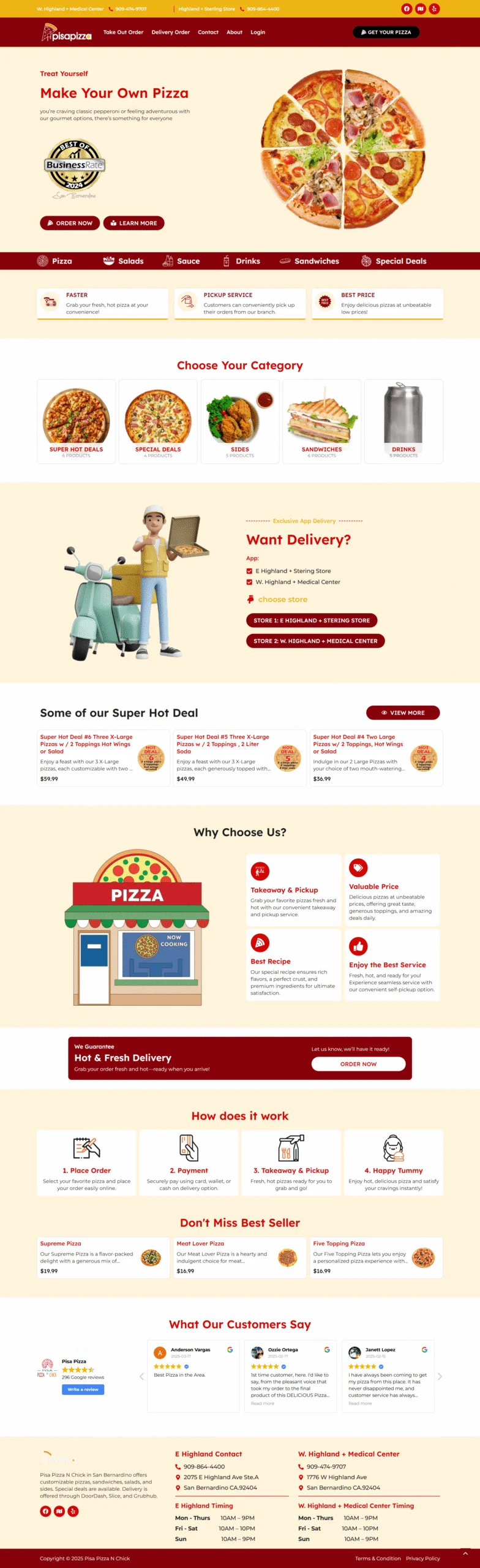
We built a warm, food-first website in deep red, cream and yellow. A top bar shows both stores with their phone numbers and social icons. The red header carries the Pisa Pizza logo, links for Take Out Order, Delivery Order, Contact, About and Login, and a “Get Your Pizza” button.
Hero and menu bar
The hero reads “Make Your Own Pizza” next to a large pizza image, with “Order Now” and “Learn More” buttons. A red menu bar below it links to Pizza, Salads, Sauce, Drinks, Sandwiches and Special Deals. Three small cards then highlight fast service, pickup and pricing.
Categories and branch selection
The “Choose Your Category” section shows image tiles for super hot deals, special deals, sides, sandwiches and drinks, each with a product count. A “Want Delivery?” section lists both stores and gives each one its own button, so customers choose their branch before ordering.
Deals and best sellers
A “Super Hot Deal” row shows combo offers with prices and short descriptions, plus a “View More” button. Later on the page, a “Don’t Miss Best Seller” row features individual pizzas with their prices.
Why choose us, how it works and reviews
An illustrated “Why Choose Us” section covers takeaway and pickup, value pricing, recipes and service. A banner promises hot, fresh pickup with an “Order Now” button. A four-step “How Does It Work” strip explains the flow: place order, payment, takeaway and pickup, then enjoy.
A Google reviews section shows customer feedback. The footer lists the address, phone and opening hours for each store side by side.
Key features
- Branch selection with a button for each store
- WooCommerce product catalog grouped by category
- Online takeout ordering with pickup
- Deal and best-seller rows with prices
- Menu bar for quick category jumps
- Customer login
- Four-step ordering explainer
- Google reviews section
- Separate hours and contact details for each branch
The portfolio also notes order management and a custom dashboard for the restaurant team, which sit behind the customer-facing pages.

What technology does the site use?
The portfolio states that this build uses WooCommerce integration for pickups, which runs on WordPress. Branch selection, order management and a custom dashboard were built on top of that setup.
Results
The site was designed to route each online order to the correct branch and make ordering quick on mobile. Customers pick a store, choose from clear categories and deals, and choose how to pay before picking up. The ordering guide lists card, wallet and cash options.
Frequently asked questions
What did AutoGen CRM build for Pisa Pizza?
We built a multi-branch food ordering website. It includes branch selection for two San Bernardino stores, a WooCommerce product catalog, deal and best-seller sections, online takeout ordering for pickup, a four-step ordering guide, Google reviews and a footer with each store’s hours. The portfolio also lists order management and a custom dashboard.
How does branch selection work on a restaurant website?
The customer chooses a store before or during ordering. On this site, each branch has its own button in the “Want Delivery?” section and its own details in the header and footer. Choosing first means the order, the pickup address and the opening hours all match the right kitchen.
Why use WooCommerce for restaurant ordering?
WooCommerce runs on WordPress and handles products, carts and checkout. That makes it a practical base for menus, combos and pickup orders on a site the restaurant controls, instead of relying on a delivery marketplace for every order. It can also be extended with branch logic and a staff dashboard, as this project was.
Can a restaurant still use delivery apps with its own site?
Yes. This restaurant’s footer notes that delivery is offered through DoorDash, Slice and Grubhub, while its own site handles takeout and pickup orders. Many restaurants run both. The website gives regular customers a direct way to order, and the apps reach people who browse there first.
Can you add text marketing to a restaurant website?
Yes. We can connect order or sign-up forms to GoHighLevel, then send deal alerts, pickup reminders and review requests by text or email. Business texting in the US requires A2P 10DLC registration, which we help clients complete as part of our setup packages.
Want something similar?
If you run a restaurant or a small chain, see our restaurant solutions and our GoHighLevel website service. Starting prices are on our pricing page. Book a free call on our contact page or phone +1 (681) 276-7045.
See the original screenshot on our Pisa Pizza multi-branch portfolio page.