Ready to Try GoHighLevel?
Get the all-in-one platform for CRM, automations, funnels & websites — built for agencies.
Start your free trial and explore every feature.
GoHighLevel includes 400+ free website templates inside the built-in Template Library, plus a marketplace of premium templates ranging from $47 to $497. Free templates work for most local service businesses. Paid templates are better for niche-specific design and faster launches. The biggest mistake people make: choosing a funnel template when they need a website template, or vice versa. They are not the same thing. This guide covers the difference, where to find both free and paid templates, and how to pick the right one for your business or client.
GoHighLevel has two types of templates that get confused all the time: website templates and funnel templates. They are not interchangeable.
A website template gives you a multi-page site with navigation, blog, and SEO structure. A funnel template gives you a single conversion path with no navigation. If you pick the wrong one, you rebuild from scratch.
This guide covers everything you need to know: the difference between the two, where to find free templates inside GHL website service, where to find premium ones in the marketplace, how to pick the right one, and the customization sequence that most agencies skip.”
Option 3, Aakhir mein: “This guide covers everything you need to know: the difference between the two, where to find free templates inside GHL, where to find premium ones in the marketplace, how to pick the right one, and the customization sequence that most agencies skip, all optimized for your GHL website service.”
Kaunsa option pasand hai? Ya koi aur jagah chahiye keyword? 😊
What GoHighLevel Website Templates Actually Are
A GHL website template is a pre-built multi-page site structure inside the GHL Website Builder. Every template includes:
- Homepage
- Services or product pages
- About page
- Contact page with form
- Optional: blog, gallery, testimonials, FAQ pages
- Full navigation menu connecting all pages
- SEO meta tag support per page
- Mobile-responsive design
- Pre-styled colors, fonts, and button designs
You import the template, replace the placeholder content with your real branding, copy, and images, and publish. Most templates are ready to launch in 1 to 3 hours.
Website Templates vs Funnel Templates: The Operational Difference
This is the single most important distinction in GHL templates. Pick the wrong type and you waste hours.
| Feature | Website Template | Funnel Template |
|---|---|---|
| Pages | Multiple (5 to 15+) | Single or multi-step (1 to 5) |
| Navigation menu | Full nav menu with links | No navigation (deliberate) |
| Blog | Yes, native blog page | No blog capability |
| SEO control | Full meta tags per page | Basic meta tags |
| Best for | Service businesses, agencies, local companies | Lead gen, webinar, VSL, offer pages |
| Traffic source | Organic search, brand traffic | Paid ads, email, social |
| Conversion focus | Brand building plus lead gen | Maximum single conversion |
Use a Website Template When
- Your client needs a full brand presence with multiple pages
- The traffic will mostly come from organic search and brand searches
- The business has multiple services that each deserve their own page
- SEO and a blog are part of the strategy
Use a Funnel Template When
- You’re driving paid ad traffic (Google, Facebook, YouTube) to a single offer
- The goal is one specific action: book, opt-in, buy, register
- Navigation menus would distract from the conversion
- You’re testing an offer before committing to a full website
The Real-World Combo Most Businesses Need
For most service businesses, the right architecture is both:
- Main domain: A multi-page GoHighLevel website for organic traffic and brand searches
- Subdomains or paths: Separate funnels for paid ad campaigns (offers.yoursite.com or yoursite.com/quote)
Build them separately. Don’t try to make one structure do both jobs.
Free vs Paid GoHighLevel Website Templates
GHL’s template ecosystem has two layers: free templates inside the platform and premium templates from the marketplace and third-party providers.
Free Templates Inside GoHighLevel
GoHighLevel includes 400+ free website templates in the built-in Template Library. These are professionally designed, fully responsive, and free to use on any plan.
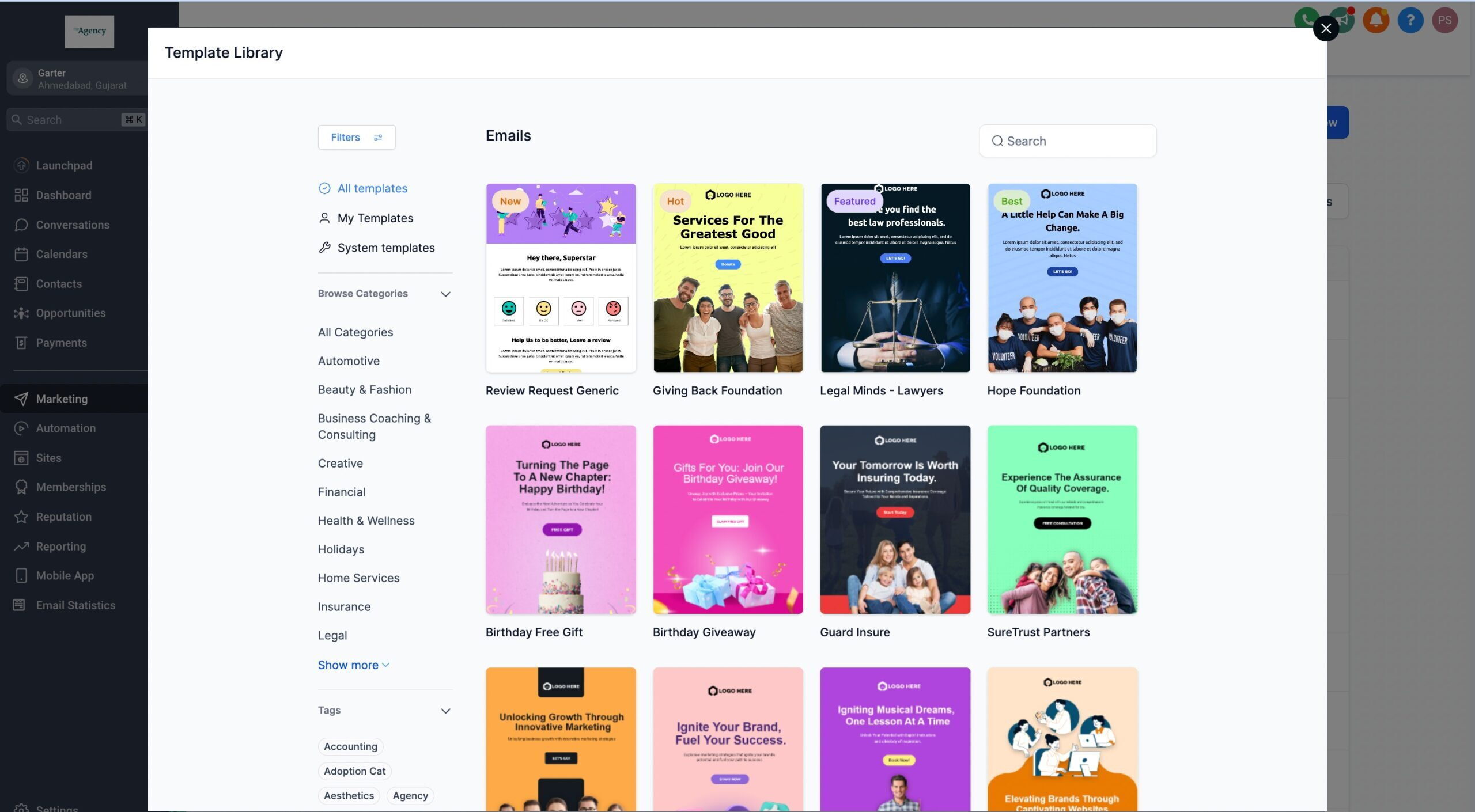
How to access free templates:
- Log into your GHL sub-account
- Go to Sites in the left sidebar
- Click Websites
- Click + New Website
- Choose From Template
- Browse by category or industry
- Preview the template, then click Use Template to import
Free templates cover most common business types: agencies, local services (plumbers, roofers, HVAC, dentists), coaches, real estate, restaurants, fitness, e-commerce, and more.
Best for: Beginners, small businesses on a budget, agencies launching multiple client sites, anyone who wants to test the platform before paying for premium designs.
Trade-off: Free templates are widely used. If you and 500 other agencies use the same template, the design recognition factor is high. Customize heavily to make it look unique.
Premium Templates From the Marketplace
The GoHighLevel Marketplace and third-party providers (GHL Elite, ghlwebsitetemplates.com, ThemeForest GHL section, Fiverr designers) sell premium templates with more advanced design, niche-specific layouts, and better conversion structures.
Pricing range: $47 to $497 depending on complexity, niche specificity, and what’s bundled (snapshots, automations, copy).
Best for: Agencies serving specific niches (medical, legal, ecommerce), businesses that want a unique design that doesn’t look templated, anyone who needs a faster launch with proven conversion structure built in.
Trade-off: You pay for the design. The work to customize is similar to free templates, you just start with a better foundation.
Custom-Built Templates
A third option: hire a GHL designer on Fiverr, Upwork, or directly from a specialized agency to build a custom template. Costs typically run $300 to $2,500 depending on scope.
Best for: Established businesses with strong brand requirements, high-ticket niches where the website carries more sales weight, or anyone who specifically wants a one-of-a-kind design.
Free or Paid: Which Should You Use?
| Use Free Templates If | Use Paid Templates If |
|---|---|
| You’re a beginner learning the GHL builder | You serve a specific niche (medical, legal, ecommerce) |
| You’re testing the platform before committing | You need a unique design that doesn’t look templated |
| Budget is tight or non-existent | You want faster launch with proven conversion structure |
| You build many client sites and need a fast starting point | You’re charging clients premium rates and the site reflects that |
| The site is for internal use or an MVP | You want bundled snapshots, automations, and copy with the design |
The Honest Take
For most local service businesses (HVAC, dental, real estate, legal, fitness), a free GHL template properly customized with real photos, real testimonials, and real copy converts comparably to a $200 premium template. The design isn’t usually the bottleneck. The content is.
Where premium templates earn their cost: niche-specific layouts that solve specific conversion problems (a medical intake template with HIPAA-aware form fields, an ecommerce template with proper product schema, a real estate template with MLS-style listings).
Start free unless you have a specific reason to upgrade.
How to Customize a GoHighLevel Website Template Properly
Whether free or paid, every template needs the same customization sequence to launch well.
- Replace all placeholder copy. Headlines, body text, button text. Templates ship with generic copy (“Get Your Free Quote Today”). Replace with specific, benefit-driven copy for your offer.
- Replace all stock images. Use real photos of your team, your work, your location. Stock photos signal “template” to visitors. WebP format keeps file sizes small.
- Set your brand colors and fonts. In Site Settings, set your primary, secondary, and accent colors plus header and body fonts. This applies globally across the site.
- Replace logo placeholders. Upload your logo to the navigation and footer.
- Connect every form to a pipeline. Click each form element, edit, set Pipeline, Pipeline Stage, and a Workflow trigger. Without this, submissions land in Forms but never enter your CRM.
- Connect calendar elements. If the template has booking widgets, click each one and select your sub-account calendar from the dropdown. Default templates link to test calendars.
- Set unique meta titles and descriptions per page. Page Settings → SEO. Generic or duplicated meta tags prevent pages from ranking.
- Replace placeholder testimonials. Use real client testimonials with real names and photos. Or remove the section entirely if you don’t have any yet. Fake testimonials are worse than no testimonials.
- Compress all images to WebP. Use Squoosh.app or TinyPNG. A 3MB hero image kills mobile load speed. Aim for under 500KB per image.
- Test mobile view. Switch to mobile preview in the builder. Verify the hero, navigation, and CTAs work on a small screen.
- Connect your custom domain. Sites → Websites → your site → Domain Settings. Add the CNAME record at your DNS registrar. SSL provisions automatically.
- Test the full flow before publishing. Submit forms. Book test appointments. Verify everything lands in your CRM correctly.
Common Mistakes That Kill GHL Website Template Launches
1. Using a funnel template when you needed a website template. No navigation, no blog, no proper structure for organic traffic. You can’t add it later without rebuilding.
2. Leaving placeholder testimonials and stock images. The fastest way to make a site look fake. Replace or remove before launch.
3. Generic meta tags on interior pages. Templates ship with global meta tags but each page needs unique title and description for SEO. Most agencies forget this on About, Services, and Contact pages.
4. Skipping image compression. Uncompressed hero images push mobile load times above 3 seconds. Google PageSpeed scores tank. Compress every image before upload.
5. Not connecting forms to a pipeline. Submissions show in Forms but never enter the CRM workflow. Set Pipeline, Pipeline Stage, and a Workflow trigger on every form.
6. Forgetting the calendar connection. Booking widgets in templates link to the template creator’s test calendar. Click each one and connect to your actual calendar.
7. Publishing on the GHL subdomain. Default templates publish to a long GHL subdomain. Set your custom domain before any traffic. If you switch domains later, all your ad URLs break.
8. Not testing mobile. Most traffic is mobile. If your hero image pushes the form below the fold on mobile, you lose leads.
Best GoHighLevel Website Template Categories by Niche
The GHL Template Library organizes designs by industry. Here are the niches with the strongest template selections.
Local services: Plumbers, HVAC, roofers, electricians, landscaping, cleaning. Templates focus on phone-first design, service area listings, and quote request forms.
Healthcare: Dental, chiropractic, med spa, mental health. Templates include appointment booking, services breakdown, and trust elements (credentials, before/afters).
Real estate: Agents, brokers, property management. Templates feature listing layouts, lead capture forms, and neighborhood guides.
Coaching and consulting: Business coaches, life coaches, fitness coaches. Templates emphasize personal brand, credibility, and discovery call booking.
Agency: Marketing agencies, design firms, consultants. Templates focus on case studies, services, and contact-driven CTAs.
Legal: Law firms, solo attorneys. Templates include practice area pages, attorney bios, and free consultation forms.
Restaurant and food: Restaurants, food trucks, catering. Templates feature menus, reservations, and location/hours info.
Fitness: Gyms, personal trainers, yoga studios. Templates include class schedules, membership signup, and trial offers.
E-commerce: GHL is not a primary ecommerce platform but Simple Shop templates work for small product catalogs and lead-gen-driven retail.
HighLevel AI Studio: The 2026 Update That Changes Template Building
The biggest shift in GHL template creation this year: HighLevel AI Studio, available inside HighLevel Labs.
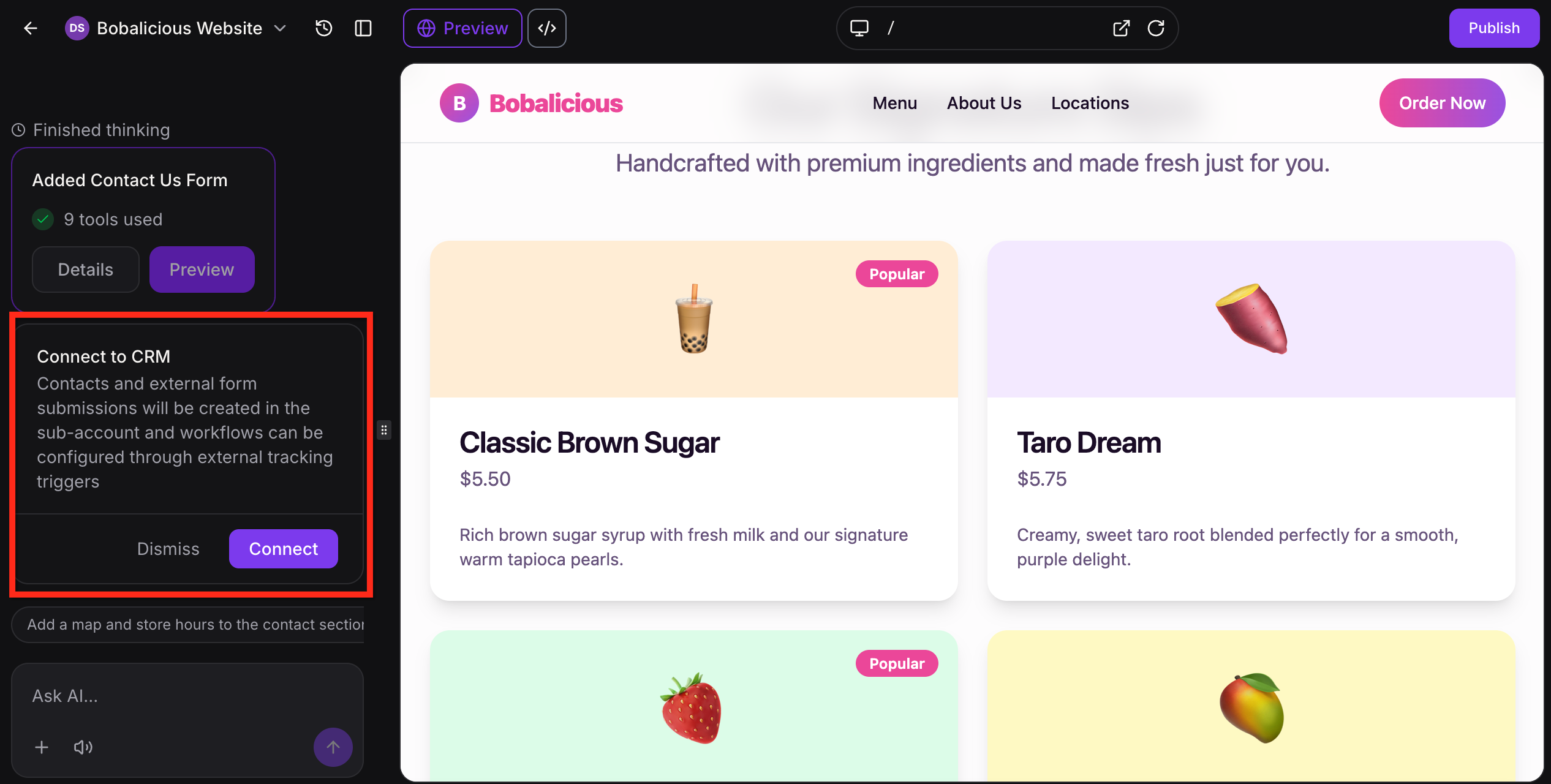
Instead of picking a template and editing it, you describe what you want in plain English. AI Studio generates the layout, copy, and images.
For website creation specifically, AI Studio can build:
- Multi-page websites from a text prompt
- Service-specific pages (one prompt per service)
- Pages from a reference URL (paste a competitor or inspiration site, AI Studio extracts the visual style)
- Pages from an uploaded screenshot for visual direction
AI Studio is currently free in HighLevel Labs while in beta. Enable it in Settings → Labs.
How it changes the template decision: If you would have paid $200 for a premium template, AI Studio can often generate a similar custom design from a prompt for free. The output isn’t always production-ready and usually needs refinement, but it gets you 70% of the way much faster than starting from a template.
Where AI Studio still loses to traditional templates: Templates have proven conversion structures, professional copywriting, and tested form flows. AI Studio output is a fast first draft. Templates are a complete starting point.
For most launches in 2026, the smartest workflow is: use AI Studio for the initial structure and copy, then refine with template-quality polish.
The Bottom Line on GoHighLevel Website Templates
GHL website templates are good enough for most local service businesses without paying anything extra. Free templates plus proper customization (real content, real photos, real testimonials) deliver professional results.
Premium templates earn their cost in specific niches where design and conversion structure matter more than general website quality. Healthcare, ecommerce, real estate, and high-ticket coaching are the niches where paid templates make the most sense.
Three rules to follow:
- Match template type to traffic source. Website templates for organic and brand traffic. Funnel templates for paid traffic.
- Customize heavily before launch. Real photos, real testimonials, real copy. Templates only work if you make them yours.
- Set the custom domain before any traffic. Don’t run ads to a GHL subdomain you’ll change later.
For most users, start with the free Template Library. Upgrade to premium templates only when a free template can’t solve your specific niche or conversion need.
Article verified and updated for 2026.
Frequently Asked Questions
How many free website templates does GoHighLevel offer?
GoHighLevel offers 400+ free native website templates inside the built-in Template Library. They cover most common business types including agencies, local services, healthcare, real estate, restaurants, fitness, coaching, and more. All free templates are professionally designed, mobile-responsive, and customizable through the drag-and-drop builder.
How much do paid GoHighLevel website templates cost?
Paid GoHighLevel templates from the marketplace and third-party providers typically range from $47 to $497 depending on complexity, niche specificity, and whether snapshots, automations, and copy are bundled with the design. Custom-built templates from designers run $300 to $2,500 depending on scope.
What is the difference between a GHL website template and a funnel template?
A website template is a multi-page site (5 to 15+ pages) with full navigation, blog support, and SEO structure, designed for organic traffic and brand building. A funnel template is a single conversion path (1 to 5 pages) with no navigation, designed to drive a specific action from paid traffic. They are not interchangeable.
Where do I find website templates in GoHighLevel?
In your GHL sub-account, go to Sites → Websites → + New Website → From Template. The Template Library opens with all 400+ free templates organized by category and industry. You can preview each template on desktop and mobile before importing.
Can I import third-party GoHighLevel website templates?
Yes. Most third-party templates come as either funnel share links or snapshot codes. For website templates, you typically receive a share link from the seller. To import, go to Sites → Websites → Import Website and paste the link. The template loads into your sub-account ready to customize.
Are GoHighLevel website templates mobile-responsive?
Yes. All native GoHighLevel website templates are mobile-responsive by default. However, heavy customization (especially custom CSS or oversized images) can break responsiveness. Always preview and test on mobile before publishing.
Can I use a custom domain with GoHighLevel website templates?
Yes. Connect your custom domain under Sites → Websites → your site → Domain Settings. Add the CNAME record provided by GHL at your DNS registrar. SSL is provisioned automatically. DNS propagation takes 5 to 30 minutes on most registrars.
Does GoHighLevel have a blog feature in website templates?
Yes. GHL websites include a native blog feature. Add a Blog page from the page list in your website editor. Blog posts are managed under Sites → Blogs. The blog supports SEO meta tags, categories, author profiles, featured images, and integrates with your website navigation automatically.
How does HighLevel AI Studio compare to traditional templates?
HighLevel AI Studio (free in HighLevel Labs) generates pages and websites from a text prompt instead of starting from a fixed template. It’s faster for unique designs but the output usually needs refinement. Traditional templates have proven conversion structures and professional design built in. The best workflow for most users in 2026 is using AI Studio for the initial structure and templates for proven polish.
How long does it take to launch a GHL website from a template?
A free template properly customized (real content, real photos, real testimonials, all forms connected) typically takes 1 to 3 hours for a single-location service business. A premium template with bundled snapshots can be ready in under an hour. Custom-built sites take 1 to 2 weeks depending on scope.
Ready to Get Your GoHighLevel System Built?
We'll build your entire GHL setup for $499 and give you a free professional website.
Contact Us Now